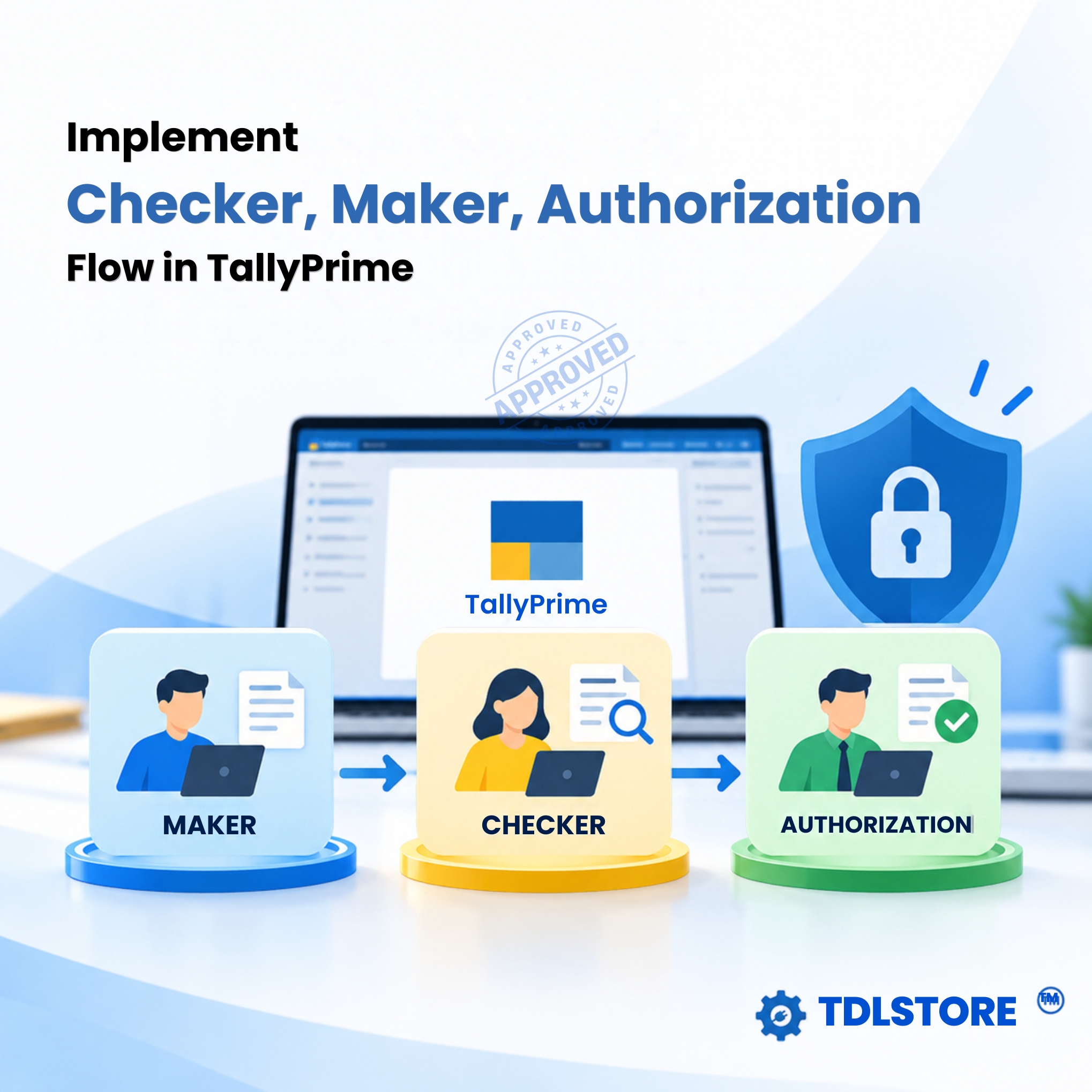


TDL for Maker, Checker, Approval Workflow in TallyPrime
Original price was: Rs. 6,999.Rs. 4,999Current price is: Rs. 4,999. + GST
A must-have TallyPrime add-on for businesses with multiple users, departments, and internal approval processes. Bring structured approval workflow and better financial control to TallyPrime
This TDL add-on lets you assign Maker, Checker, and Authorizer roles to TallyPrime users and control who can create, check, and authorize vouchers — with optional voucher-wise amount limits and permissions.
How the Approval Workflow Works
Maker → Checker → Authorizer → Regular Books
👤 Maker
A Maker can create vouchers in TallyPrime. These vouchers are marked as Pending and are not posted to the regular books until they are authorized.
🔎 Checker
A Checker can create and review vouchers. Once checked, the voucher is marked as Checked, but it remains outside the regular books until an Authorizer approves it.
The Checker can also reject vouchers with remarks, allowing the reason for rejection to be recorded.
✅ Authorizer
An Authorizer can create and authorize vouchers. Once authorized, the voucher is posted to the regular books of accounts.
Control Who Can Do What
Configure user-level permissions to create a controlled approval environment:
- Assign Maker, Checker or Authorizer roles to TallyPrime users
- Set voucher amount limits for each user or role
- Define allowed voucher types for each user or role
- Prevent unauthorized vouchers from being posted to regular books
- Maintain a clear approval trail for every voucher
Complete Voucher Approval Trail
Easily identify:
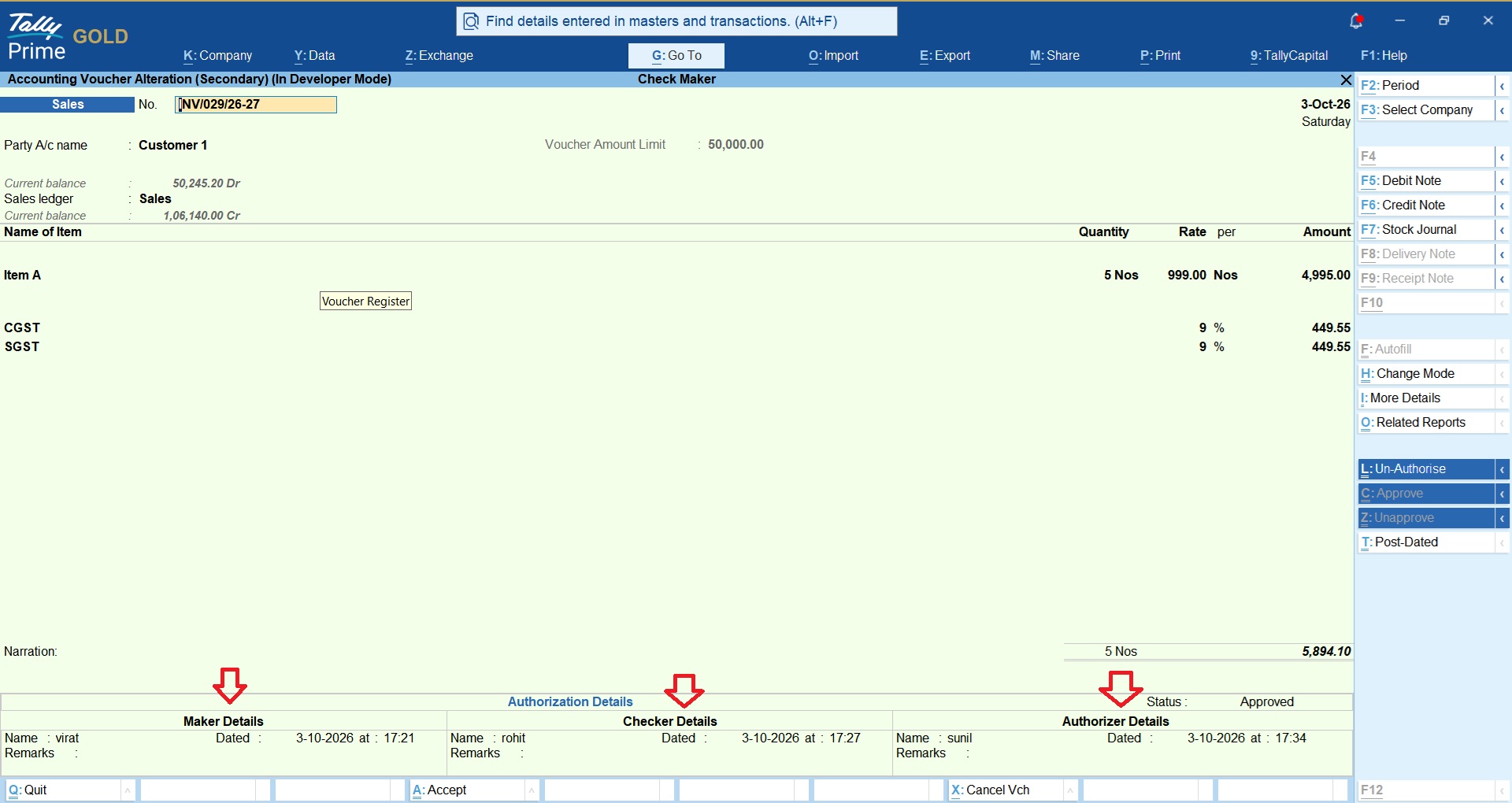
Entered By → Checked By → Authorized By
View the complete approval history of a voucher and know exactly who created, checked, and authorized it.
Ideal for Businesses With Multiple TallyPrime Users
This add-on is particularly useful for organizations that want to introduce a Maker–Checker–Authorizer workflow and strengthen internal financial controls within TallyPrime.
It helps businesses bring better accountability, controlled voucher entry, structured approvals, and greater visibility to their accounting process — without changing their regular TallyPrime workflow.
Watch the demo below and the Screenshot’s before you purchase the add-on
Download 3 Days Free Trial Now
| Mode of Support | Anydesk, Email, Zoom Meeting |
|---|---|
| Supported Version | Tally.ERP9, TallyPrime |
| Updates | Free |
| User Type | Multi User, Single User |
| TDL Validity | Lifetime |
Get 10% extra off on purchase of TDL's worth Rs. 4,500 and above | Coupon Code : "EXTRA10"
Maker, Checker, Approval Workflow in TallyPrime at a Glance
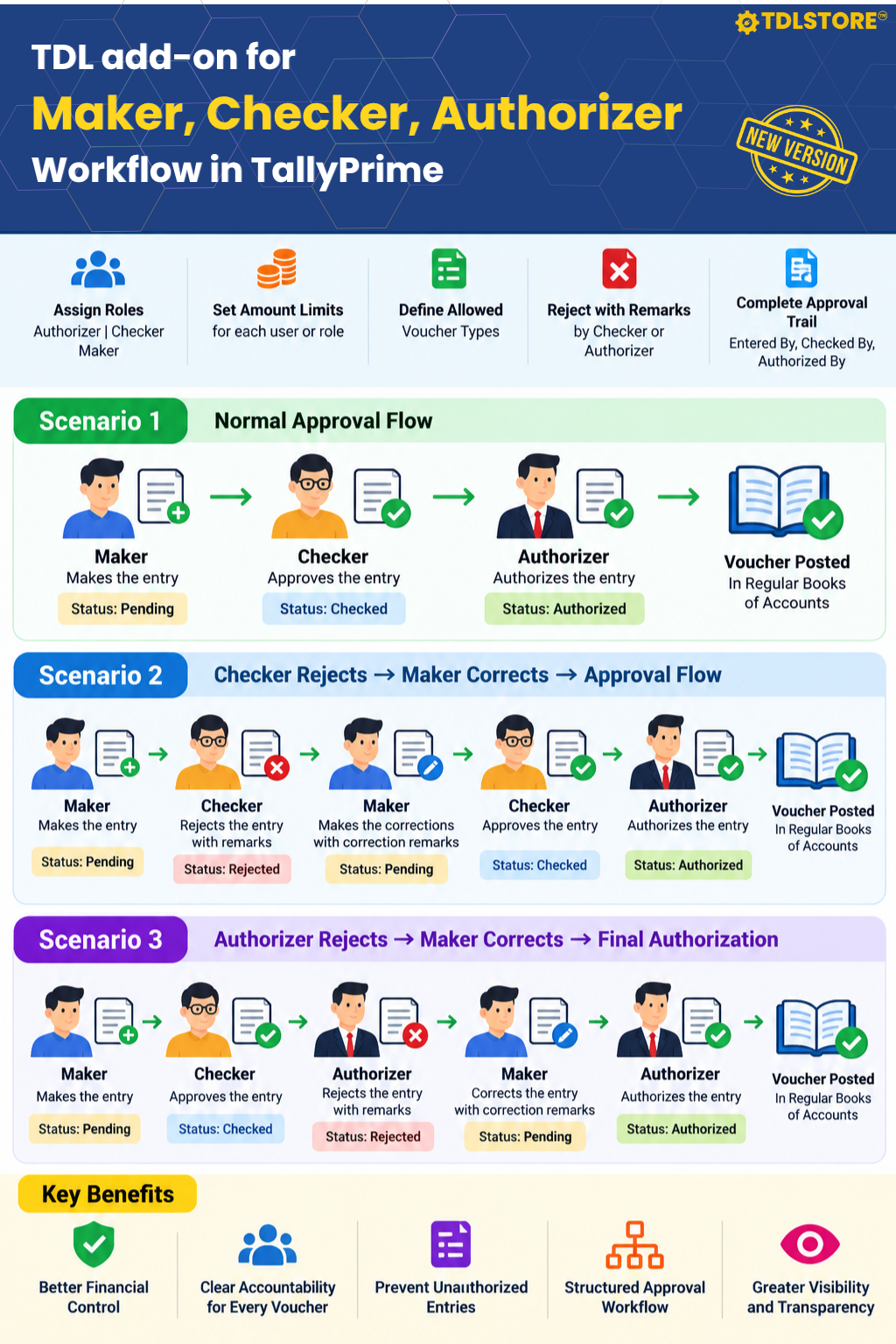
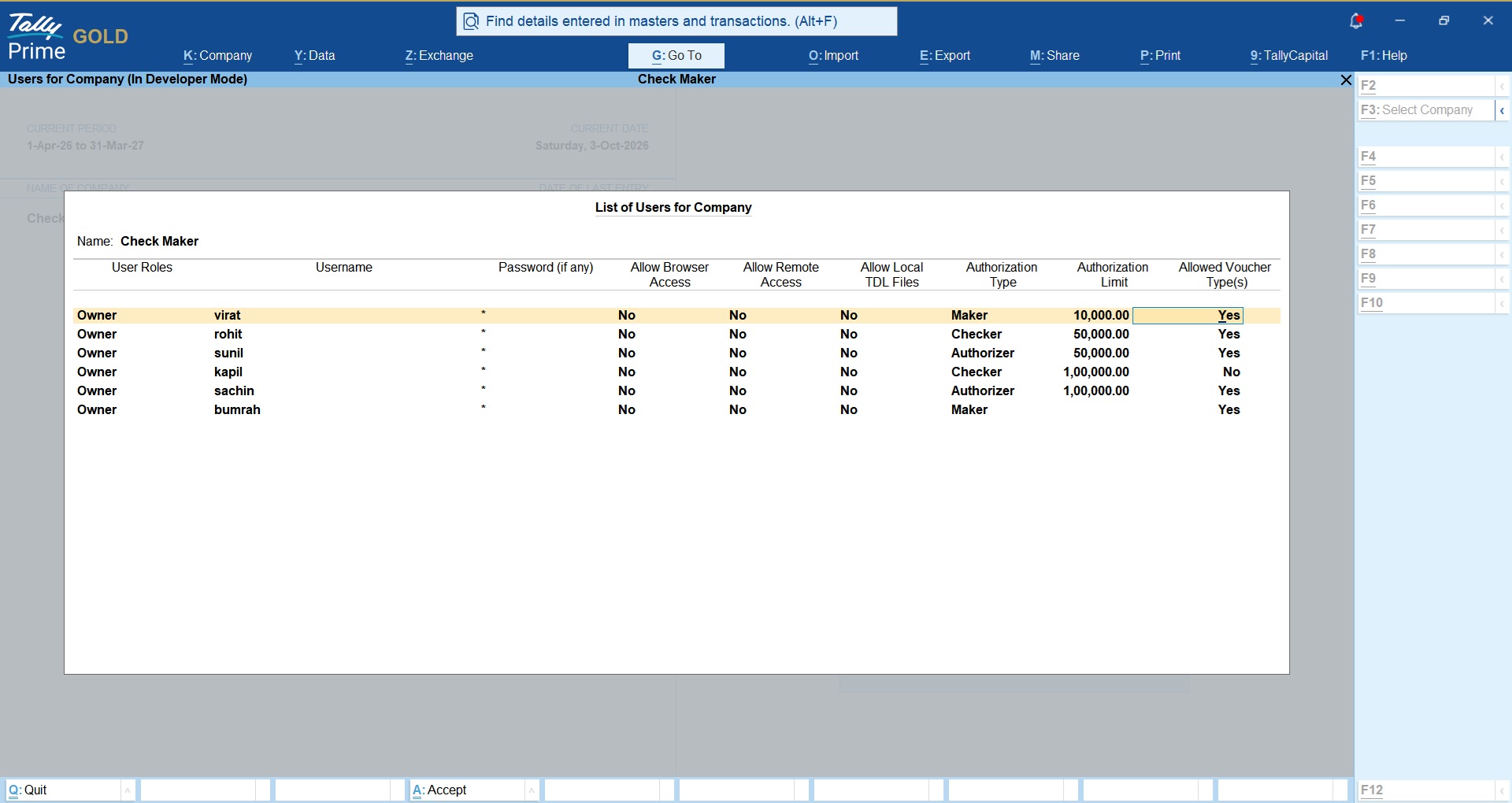
Refer below snapshots of Maker, Checker, Approval Workflow in TallyPrime module.
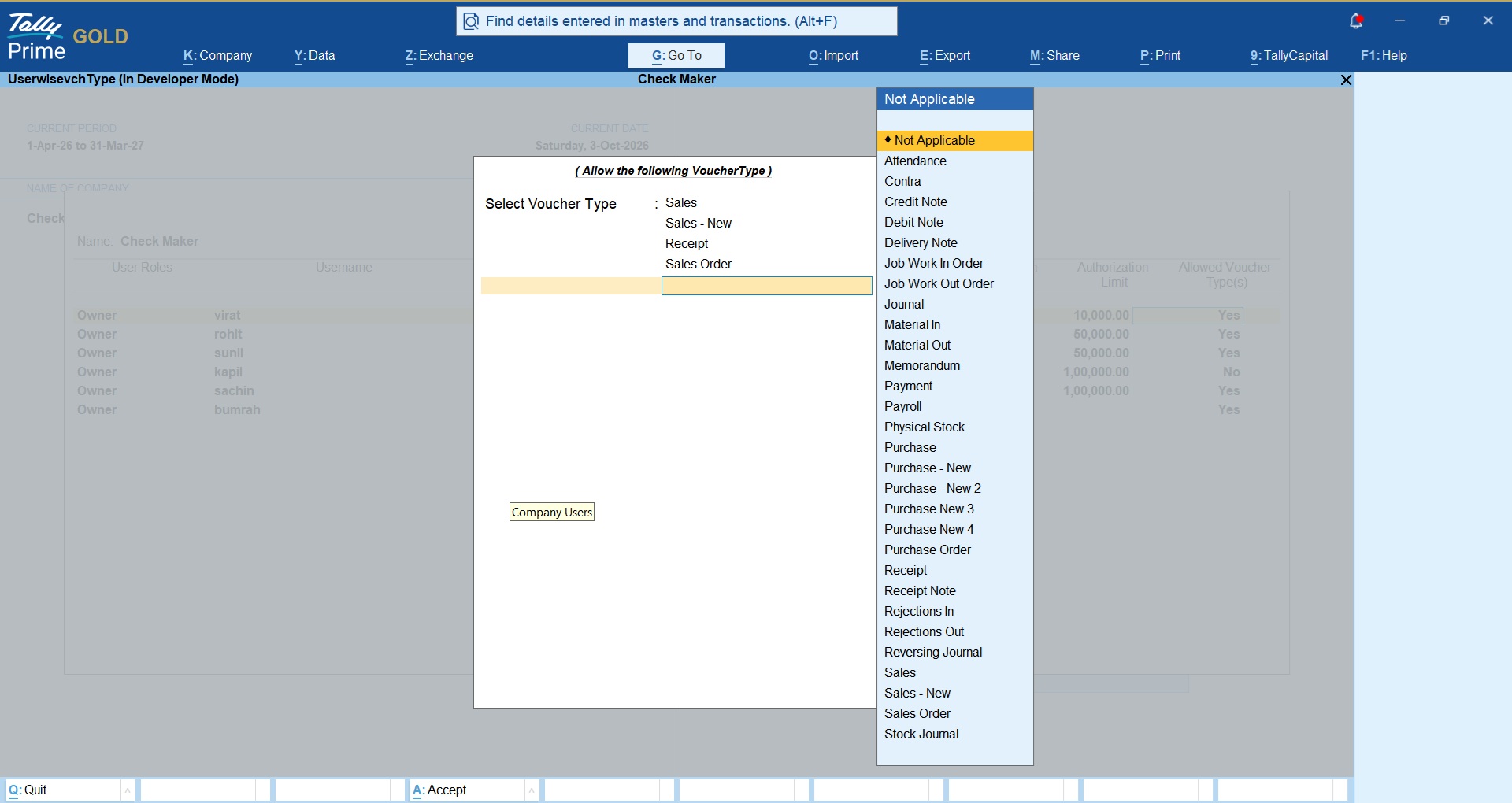
- Under users and passwords admin can define following;
- User roles like Maker, Checker & Authorizer
- User allowed transaction limits
- User allowed Voucher Types
When user log-in, Transaction status window will prompt
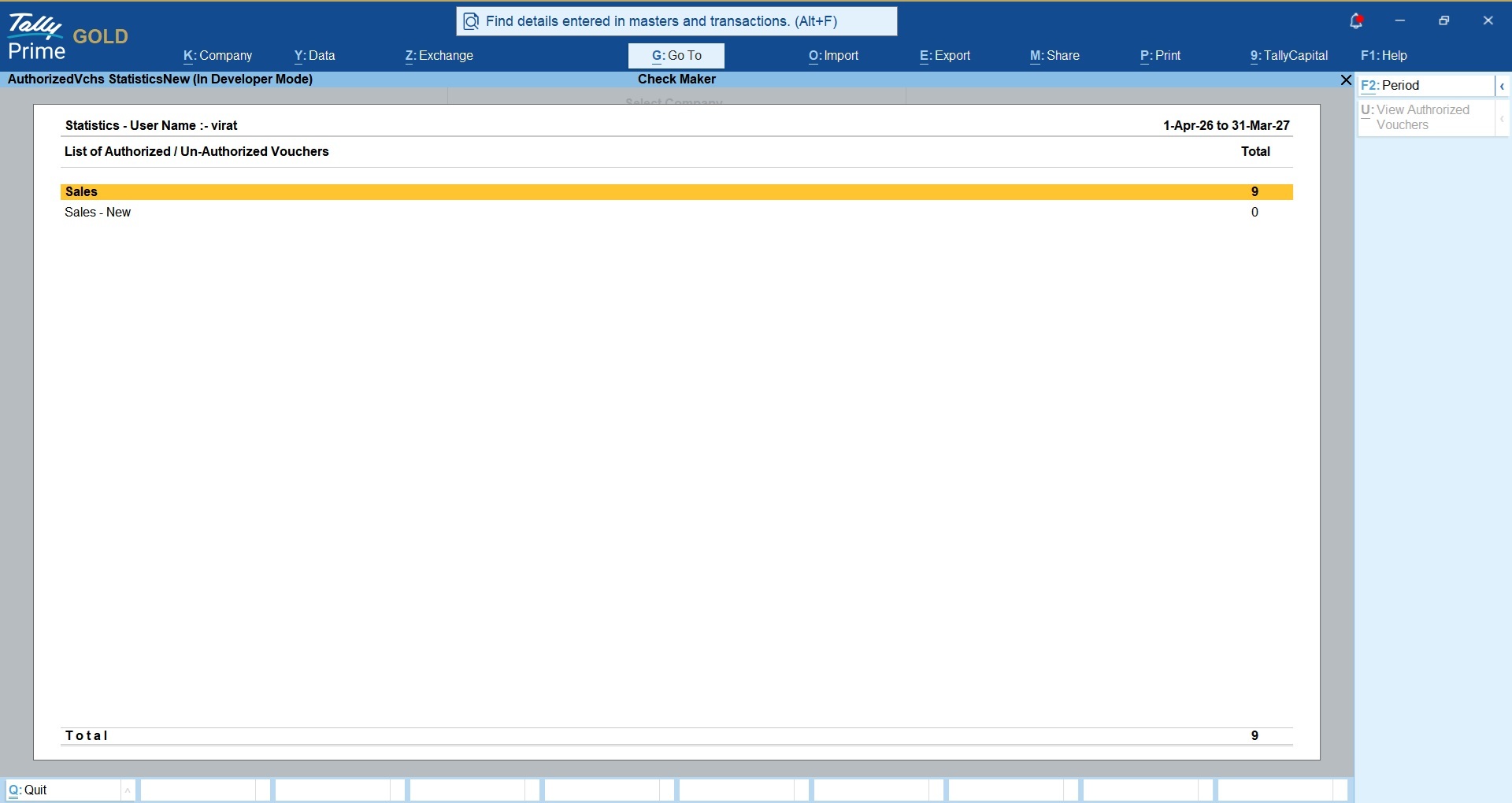
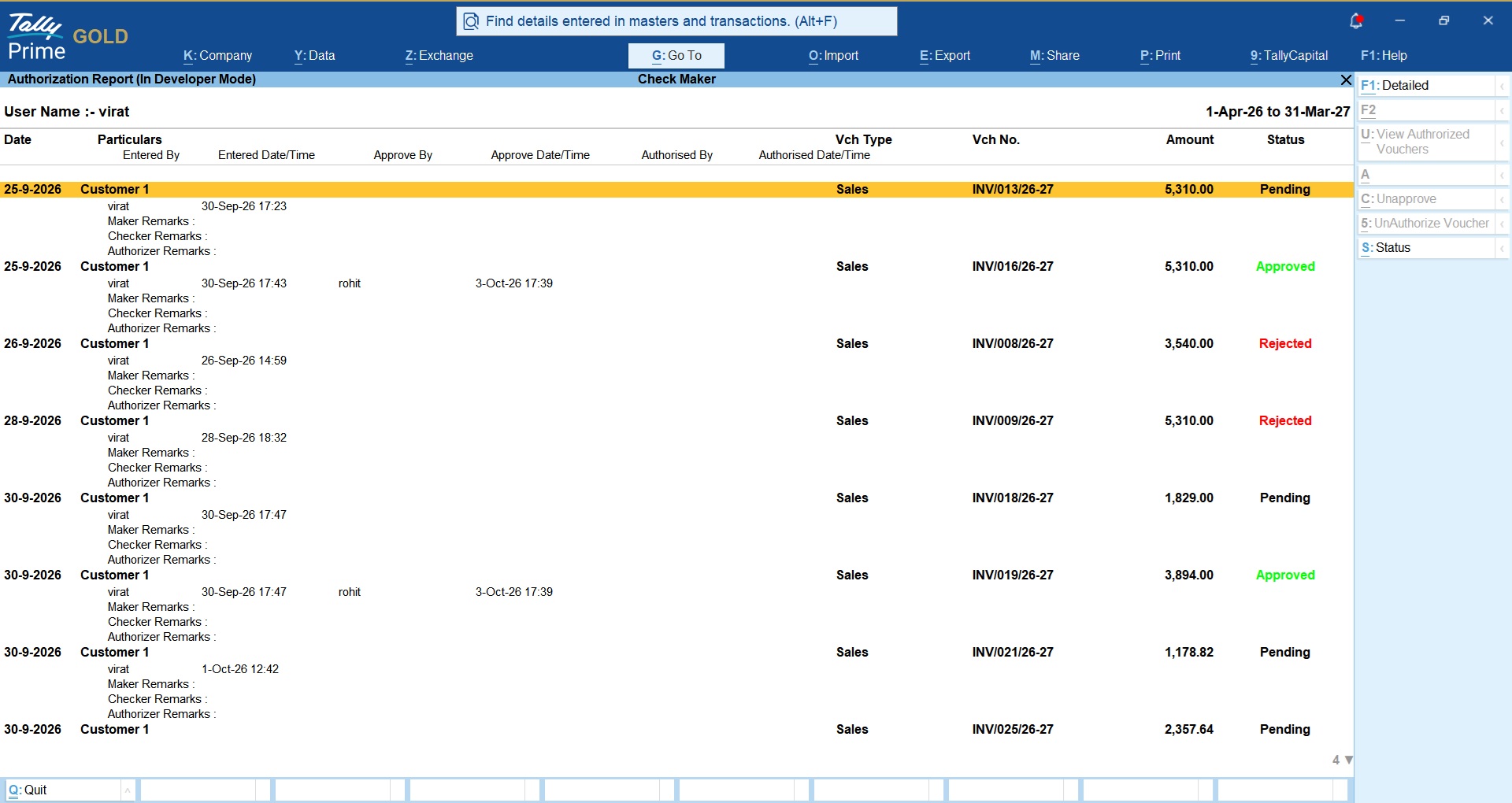
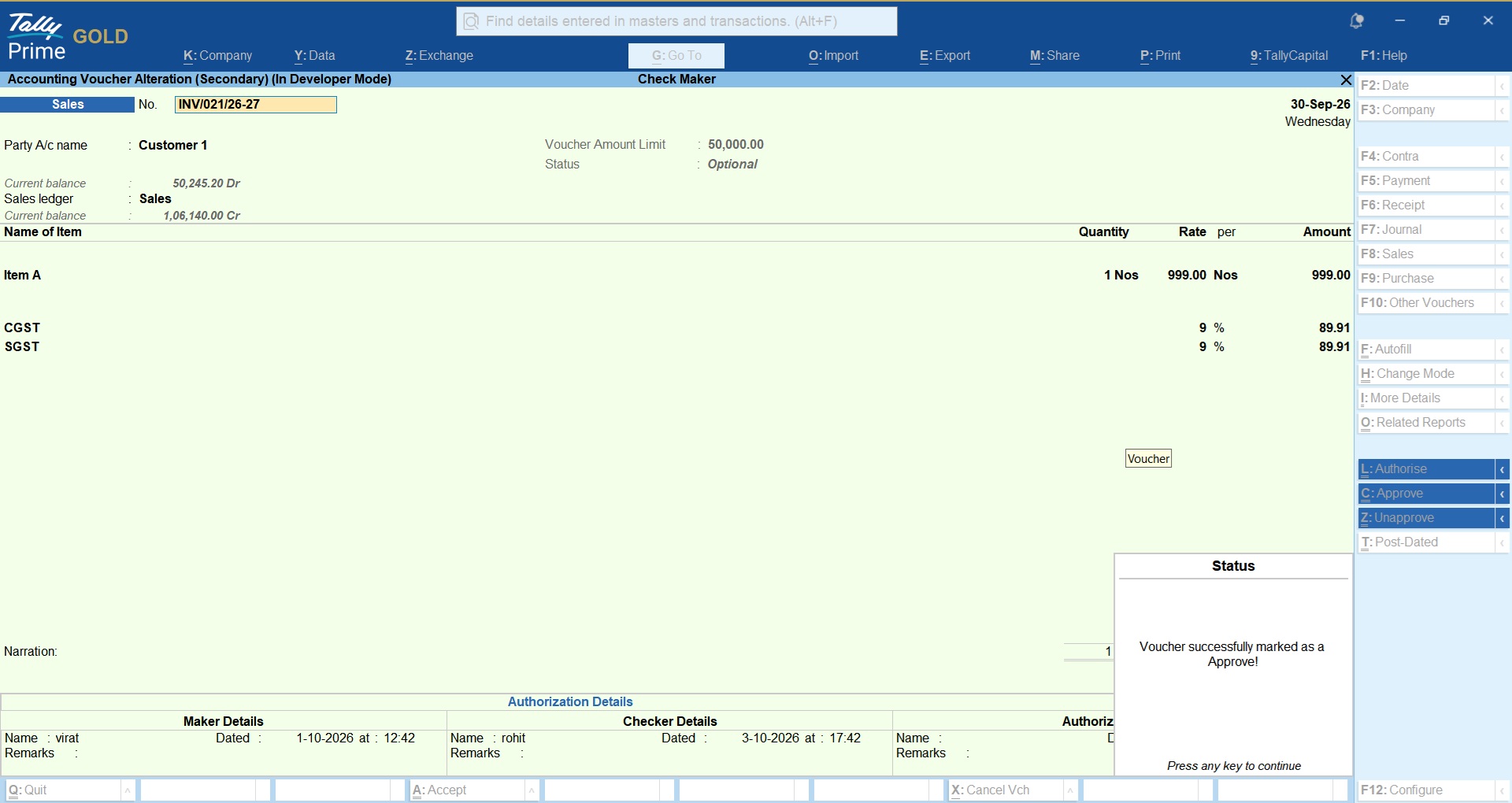
Transaction wise approval status will be displayed like vouchers Pending, Rejected or Approved.
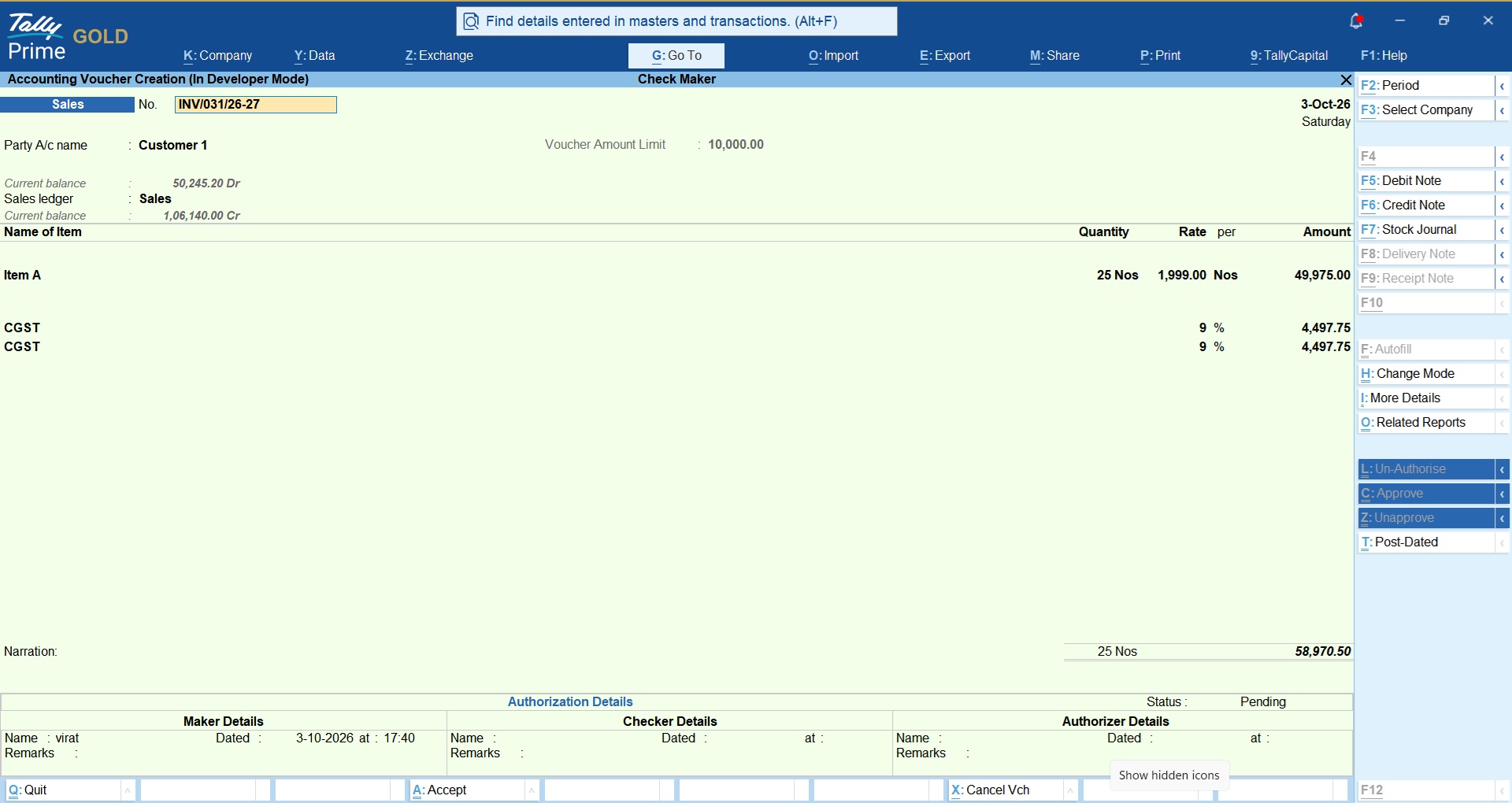
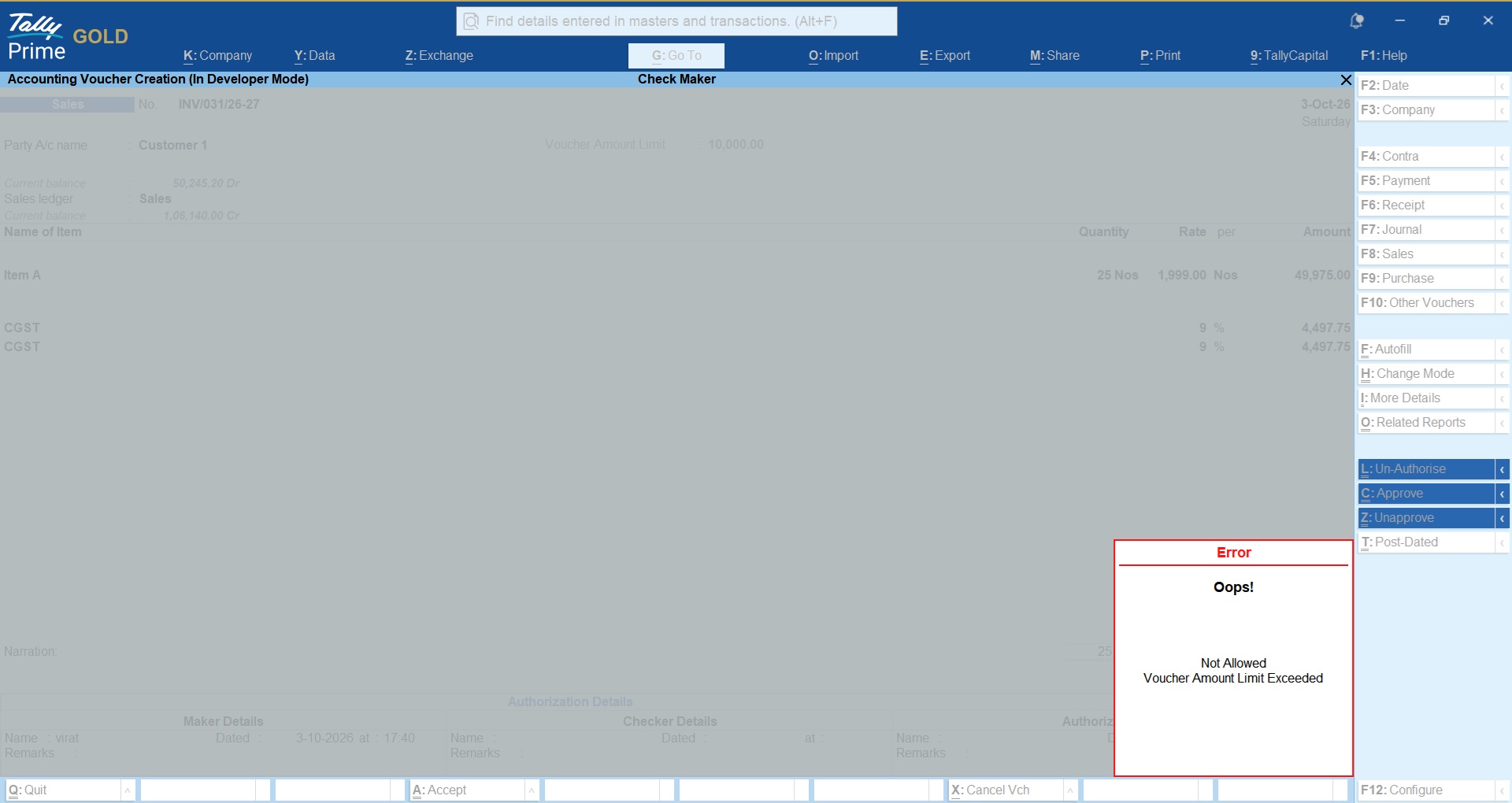
Makers, Checkers and Authorizers are allowed to perform tasks according to the allowed value set.
If no value limit is set then restriction will be not applied.
Checker/Authorizer will be asked to enter valid remark for the rejection and that remark will be displayed to the maker.
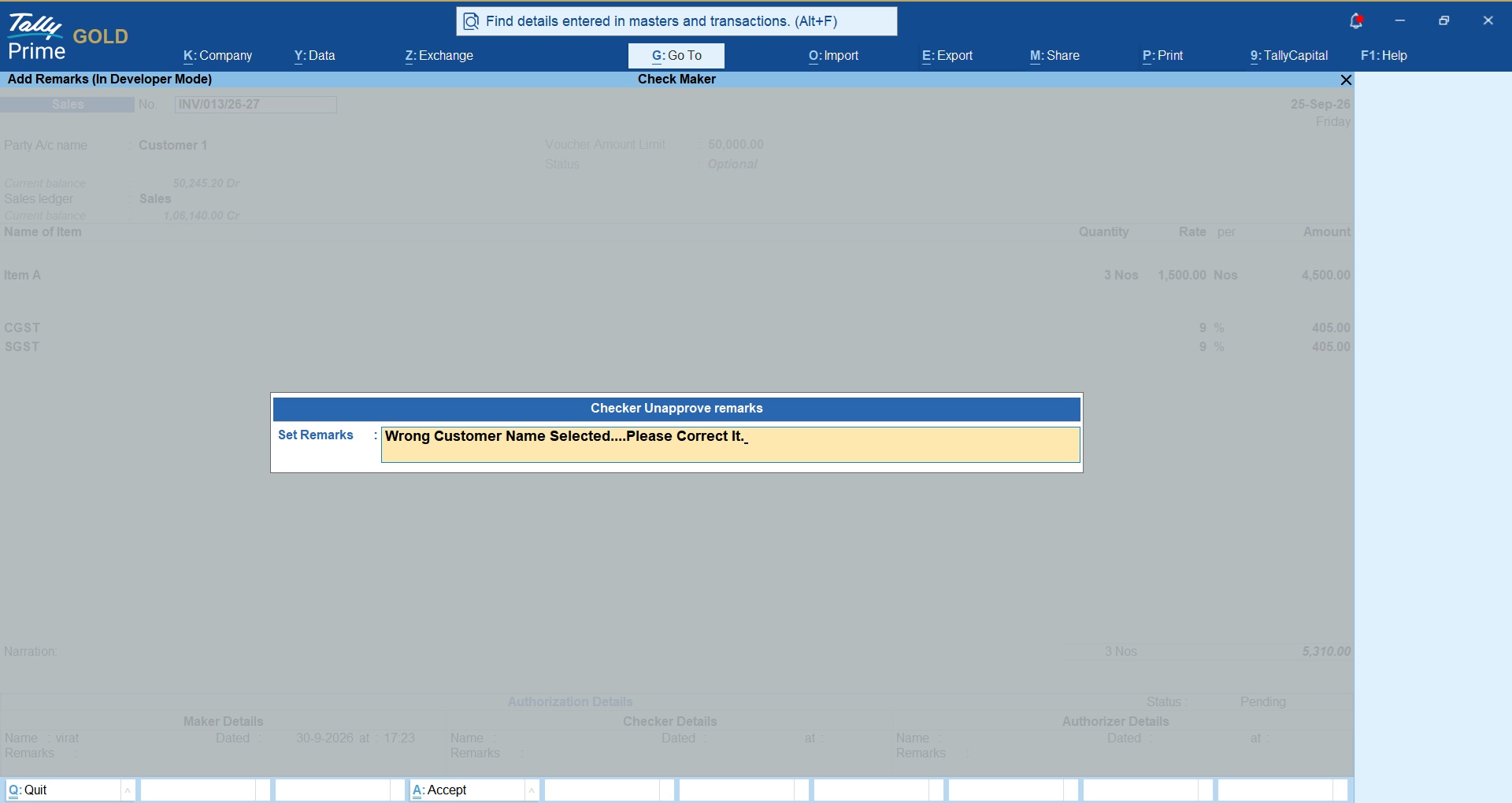
Voucher Approved notice
Complete trail of voucher will be displayed Entered By, Checked By and Authorized By as shown in below snapshot;
Importance of Maker, Checker, Approval Workflow for TallyPrime Users
TallyPrime is widely used for accounting and business management, and many organizations operate a single company data set with multiple users.
As the number of users increases, simply providing access to the accounting system may not be sufficient for organizations that require formal approval procedures.
A business may need to distinguish between:
Users who prepare transactions
and
Users who verify transactions
and
Users who provide final approval.
A TDL-based Maker–Checker–Authorizer solution can introduce this workflow within the TallyPrime environment.
For organizations already working with TallyPrime, this can be particularly useful because the approval process can be incorporated into the existing accounting workflow rather than relying entirely on separate spreadsheets, emails or manual approval registers.
Example: Payment Approval Workflow
Imagine a company receives an invoice for ₹2,50,000.
Step 1 — Maker
The Accounts Executive enters the payment transaction.
Status: Pending
Step 2 — Checker
The Senior Accountant verifies:
- Supplier
- Invoice
- Amount
- Ledger
- Supporting documents
The Checker approves the transaction.
Status: Checked
Step 3 — Authorizer
The Finance Manager reviews the payment and provides final approval.
Status: Authorized
Step 4 — Books
The authorized transaction is posted to the regular books.
This creates a defined chain of responsibility from transaction preparation to final authorization.
Example: Purchase Entry With Correction
Suppose a Maker enters a purchase transaction but selects the wrong ledger.
The Checker identifies the issue.
Checker: Rejects the transaction
Remark: “Please correct the purchase ledger.”
The Maker corrects the transaction and records the correction.
The Checker reviews it again and approves it.
The Authorizer then provides final authorization.
Only after the required approval is completed does the transaction move to the regular books.
This type of workflow can help organizations establish a more disciplined accounting process.
Important Considerations Before Implementing
A Maker–Checker–Authorizer system should not simply add approval steps for the sake of adding more approvals.
The workflow should be designed according to the actual business process.
Businesses should consider:
Keep the hierarchy practical
Too many approval levels can slow down routine accounting operations.
Define clear responsibilities
Every role should have clearly documented responsibilities.
Establish approval limits
High-value transactions may require additional authorization.
Define exception handling
The organization should decide what happens when a Checker or Authorizer rejects a transaction.
Maintain accountability
The system should provide sufficient information to identify the users involved in each stage.
Review the workflow periodically
As the organization grows, approval limits and user responsibilities may need to change.
Who Should Consider a Maker–Checker–Authorizer Workflow?
This workflow can be particularly relevant for:
- Companies with multiple TallyPrime users
- Businesses with multiple accounting employees
- Organizations with separate accounts and finance departments
- Companies with branch offices
- Businesses with high transaction volumes
- Organizations requiring management approval for payments
- Companies with department-wise accounting responsibilities
- Businesses handling high-value transactions
- Organizations looking to strengthen internal accounting controls
- Companies that want a documented approval trail
It can also be useful for businesses that are growing from a small accounting team into a larger finance and accounts operation.
LIFETIME VALIDITY
NO RENEWALS
7 DAYS MONEY BACK GUARANTEE
Works on Tally.ERP9 & TallyPrime
Clean & Verified Code
Here is the Quick Guide on How to Configure TDL / TCP in Tally!


Get answers to all your queries before you purchase our Tally add-ons.
Your TDL add-ons comes with Lifetime validity or Yearly Subscriptions?
All our TDL add-ons comes with truly Lifetime validity and updates
How do I purchase & get the add-ons?
It's very simple!
Simply add the required module to the cart > proceed for checkout > enter your complete billing information > place order > pay online!
On successful completion of payment, you will instantly get download link on the screen and well as in your email.
Can i get demo before purchase?
Yes, we have placed demo videos under each modules to see how exactly it works before you purchase.
We do not provide one on one demo for ready to use TDL add-ons.
Will it work on Tally.ERP9 or TallyPrime?
All our TDL add-ons are compatible with both Tally versions i.e. Tally.ERP9 and TallyPrime
How do I install TDL add-ons in my Tally?
It really very simple to configure TDL add-ons in Tally, please refer below quick video and i am sure you will be able to do it.
Will I get GST Invoice for my purchase?
Yes, you will get system generated GST invoice in your email ID immediately on successful purchase, if not found check Spam / Junk folder once.
What if your TDL add-on doesn't work in my Tally?
It works on all Tally but in case if our TDL add-on is conflict with your existing TDL's then you may either ask your existing TDL provider to correct it or simply place refund request with us by providing valid error screenshots.
Will it work on Tally multi user license?
Yes, our add-ons works on both Tally Single User and Multi User depending upon your Tally Serial number and the price will remain same for both.
Can I use add-ons on multiple Tally licenses?
If you have multiple Tally licenses, you will have to purchase it separately
Will it work on multiple companies in same Tally?
Yes, all our TDL add-ons works with any of your companies running on the same Tally license.
If you have separate Tally licenses, you will have to purchase it separately.
Will it impacts our Tally data?
No, these Tally add-ons are built securely on Tally definition language only, so it won't impact your Tally data.
However we always recommend users to take Tally backup before using any customization.
How will I get License Key for TCP activation?
License Key for your purchased TCP will be available immediately in the Email & Under My Account section on completion of your order & payment.
How can I use same TCP & License Key in multiple companies?
By default our TDL License key is permissible to use for one company only but if you have multiple companies running on the same Tally serial number then you may request for license extension request by reverting to the same purchase email.
You can even re-use or migrate the same license key by De-Activating the same key.
How much time it will take to receive the TDL after payment?
You will receive TDL instantly along with Activation License Key in your email ID as well as the same will be found under your Account section.
Release Update Dated : 07/10/2026
- You can now define transaction limits and voucher type access to the Makers as well.
- Checker and Authorizer can now Reject the voucher with Rejection remarks.
- Maker will be asked to enter valid reason for the voucher modification or re-submission for approval.
- Authorization report will now display's voucher status like Pending, Approved, Rejected with color combinations for easy identification.
- Vouchers will now clearly displays the log of voucher Entered By, Checked By and Authorized By details in the voucher footer.
Related products

TDL for Audit Trail in Tally
Original price was: Rs. 2,999.Rs. 1,999Current price is: Rs. 1,999. + GST
TDL for Disable Delete and Cancel in Tally (User-wise)
Original price was: Rs. 1,499.Rs. 999Current price is: Rs. 999. + GST

TDL for Lock Invoice if eInvoice Generated
Original price was: Rs. 2,999.Rs. 1,999Current price is: Rs. 1,999. + GST
TDL for OTP Based Login in Tally
Original price was: Rs. 4,999.Rs. 2,999Current price is: Rs. 2,999. + GST
TDL for Restrict Back Dated Entries in Tally
Original price was: Rs. 1,999.Rs. 1,499Current price is: Rs. 1,499. + GST
TDL for Restrict Groups, Ledgers & Voucher Types User Wise
Original price was: Rs. 4,999.Rs. 2,999Current price is: Rs. 2,999. + GST