


TDL for Payment Follow-up Manager
Original price was: Rs. 5,999.Rs. 3,999Current price is: Rs. 3,999. + GST
Streamline Collections. Improve Cash Flow. Never miss a Payment follow-up again.
Timely payment follow-ups are critical for healthy cash flow, yet most businesses struggle to track who followed up, when it was done, and what commitments customers made. Missed reminders, scattered notes, and incomplete communication often result in delayed collections and poor visibility for management.
This powerful TallyPrime TDL add-on solves this real-world problem by helping businesses record, organize, and monitor payment follow-ups effortlessly — right inside TallyPrime.
Whether you manage a small business or a complete accounts team, this add-on ensures that every pending payment is tracked, every follow-up is recorded, and management gets real-time clarity on collection progress.
⭐ Why This Add-on is a Must-Have for Every Business
-
Ensures timely and consistent follow-ups, leading to faster payment collection
-
Centralizes all follow-up information inside Tally — no separate tracker or Excel required
-
Gives management a single dashboard for reviewing customer-wise and bill-wise follow-up status
-
Enhances accountability across teams and avoids missed commitments
🔑 Key Features
1. Ledger-Level Follow-Up Tracking
Record all payment follow-up interactions directly at the customer ledger level.
2. Bill-Wise Follow-Up Capture
Maintain detailed follow-up notes for each outstanding bill, improving clarity and accountability.
3. Add Up to 5 Contact Persons per Customer
Store multiple client contacts and track exactly who you followed up with — ideal for businesses dealing with multiple decision makers.
4. Next Follow-Up Date & Priority Status
Mark follow-ups as Hot / Warm / Cold and set the Next Follow-Up Date to focus on priority collections and avoid missing reminders.
5. Smart Reports & Alerts
-
Daily Email Alerts: Automatically receive a list of Today’s Follow-Ups in your inbox every morning
-
On-Company-Load Reminder: Tally automatically shows today’s follow-up summary when you open the company
-
New Follow-Up Reports:
-
Ledger Wise Follow-Up Register
-
Bill Wise Follow-Up Register
These give management and accounts teams a clear view of outstanding interactions and pending commitments
-
Download 3 Days Free Trial to Explore How it Works
Check Demo Video Here
| Supported Version | Tally.ERP9, TallyPrime |
|---|---|
| Mode of Support | Anydesk, Email, Ultra Viewer |
| Updates | Free |
| User Type | Multi User, Single User |
| TDL Validity | Lifetime |
| Duration | Yearly, Lifetime |
Get 10% extra off on purchase of TDL's worth Rs. 4,500 and above | Coupon Code : "EXTRA10"
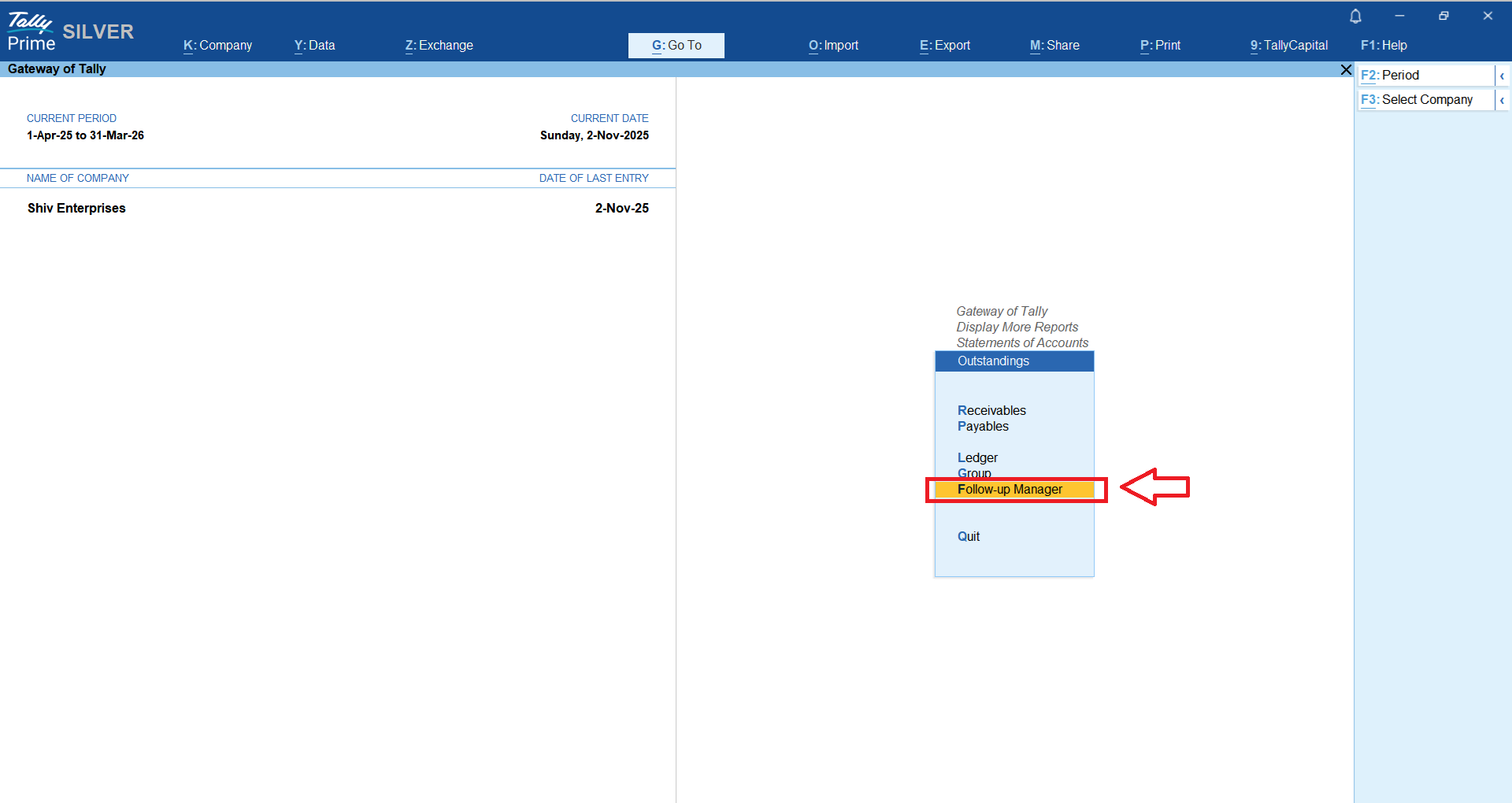
Once you activate the module, you will find new menu option as “Follow-up Manager” under Outstandings report as shwon in below snapshot;
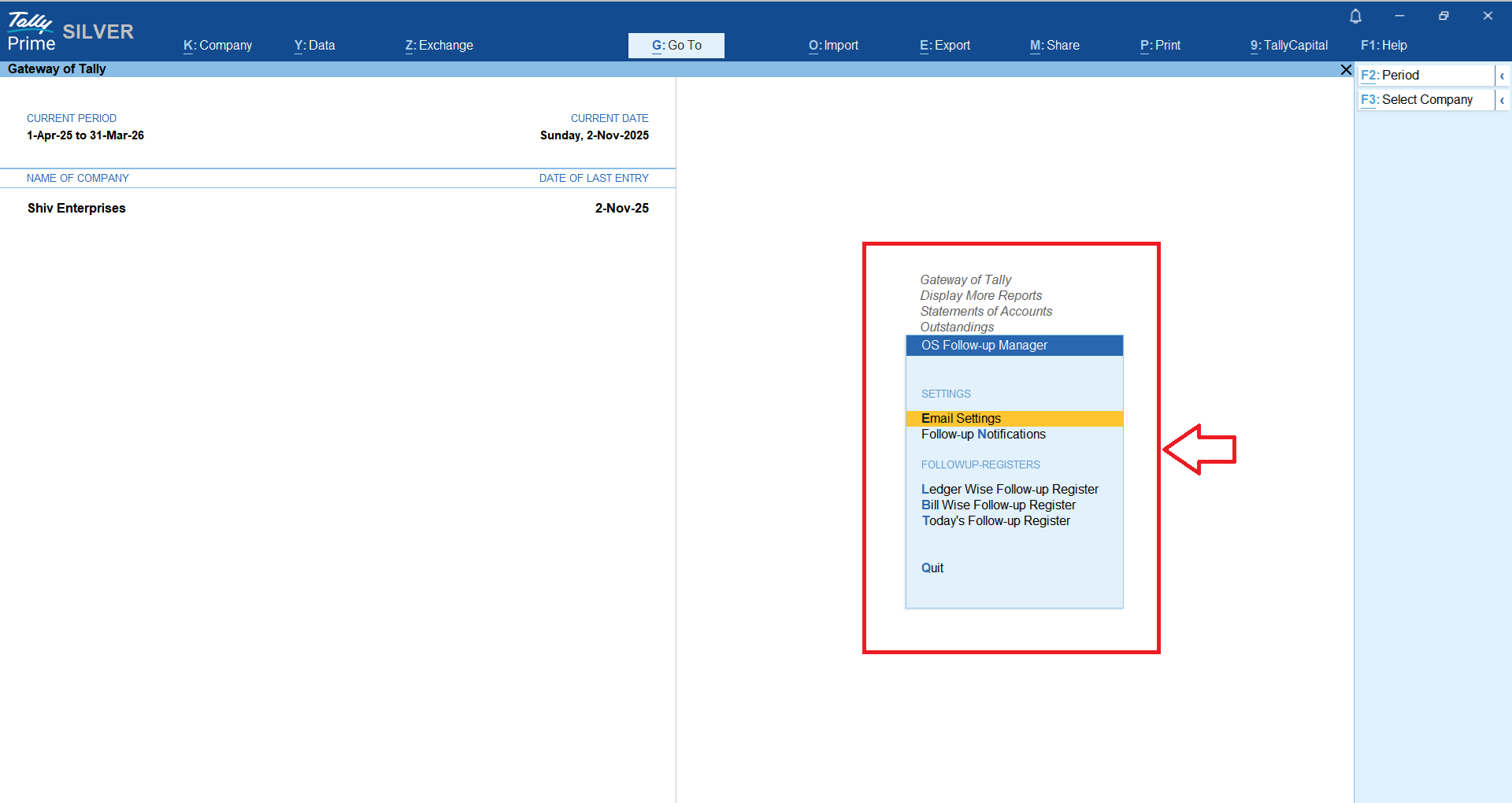
Module has a built in feature that allows you to define “Today’s Payment Followup” notification either when you load the company and / or get it over email.
This will help you and your team to monitor & target Today’s followups to boost your payment collection effortlessly.
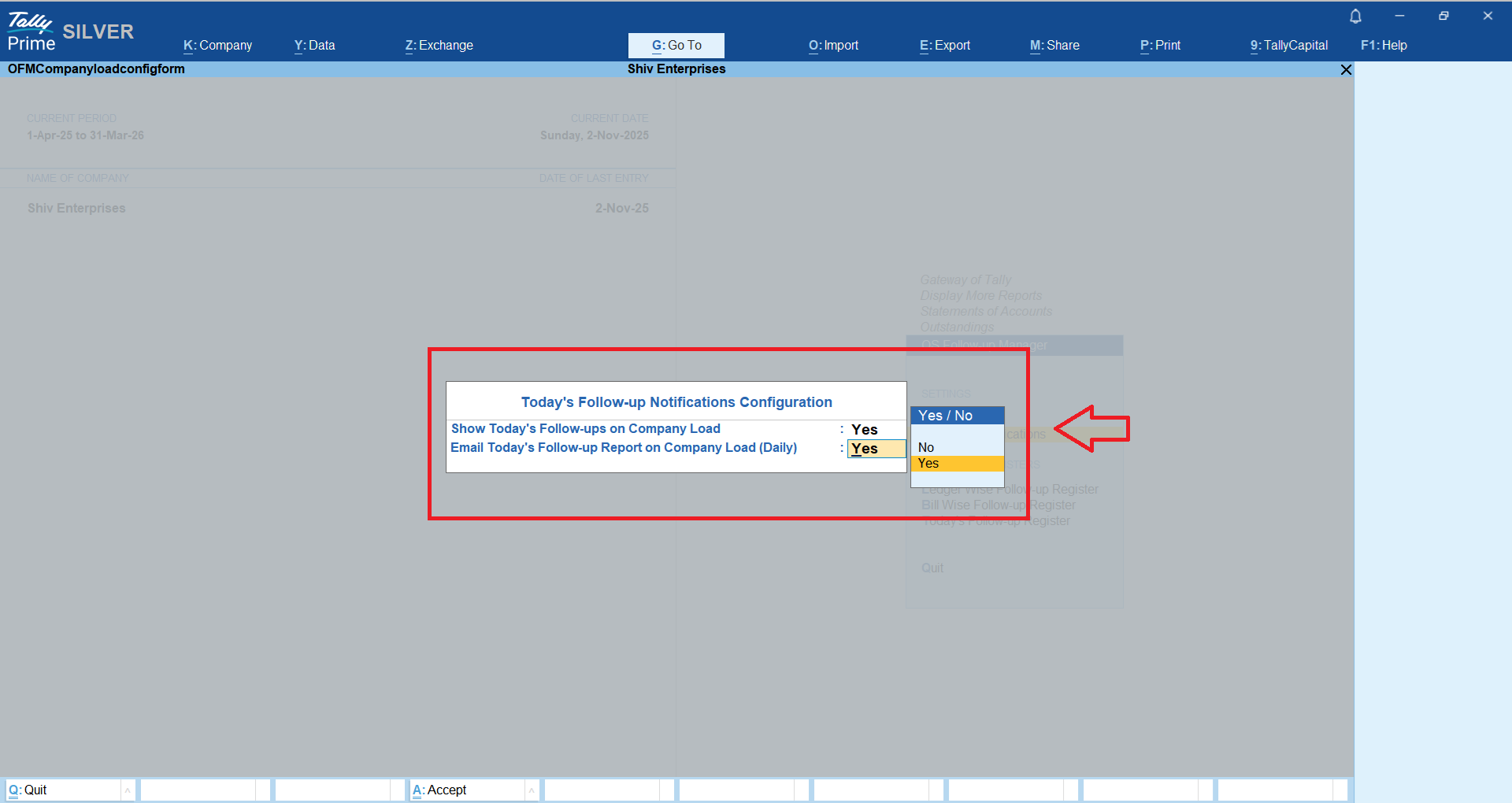
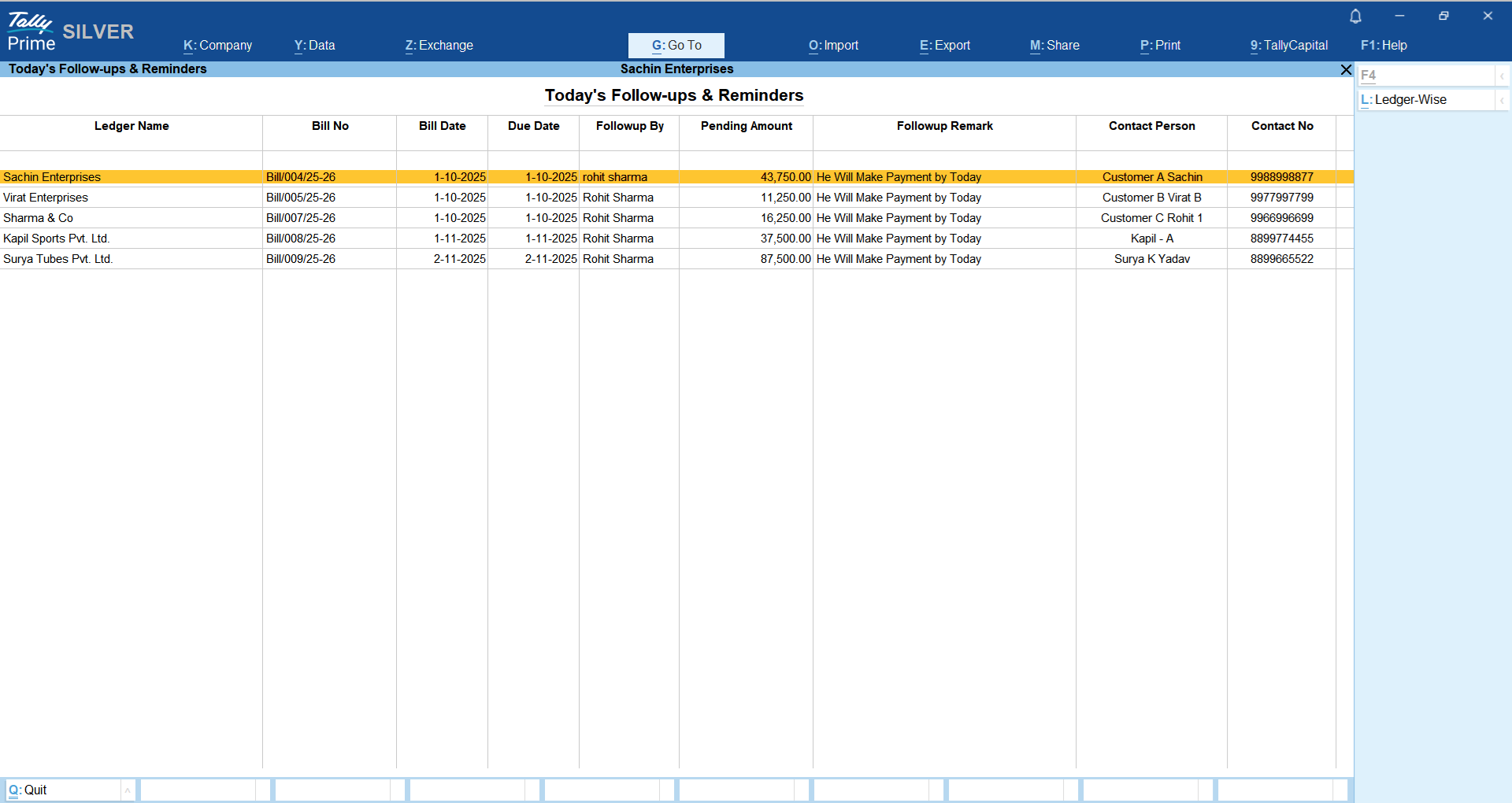
Once you enable the above option, next time whenever you open a company, you will get the prompt about Today’s Payment Follow-ups as shown belwo;
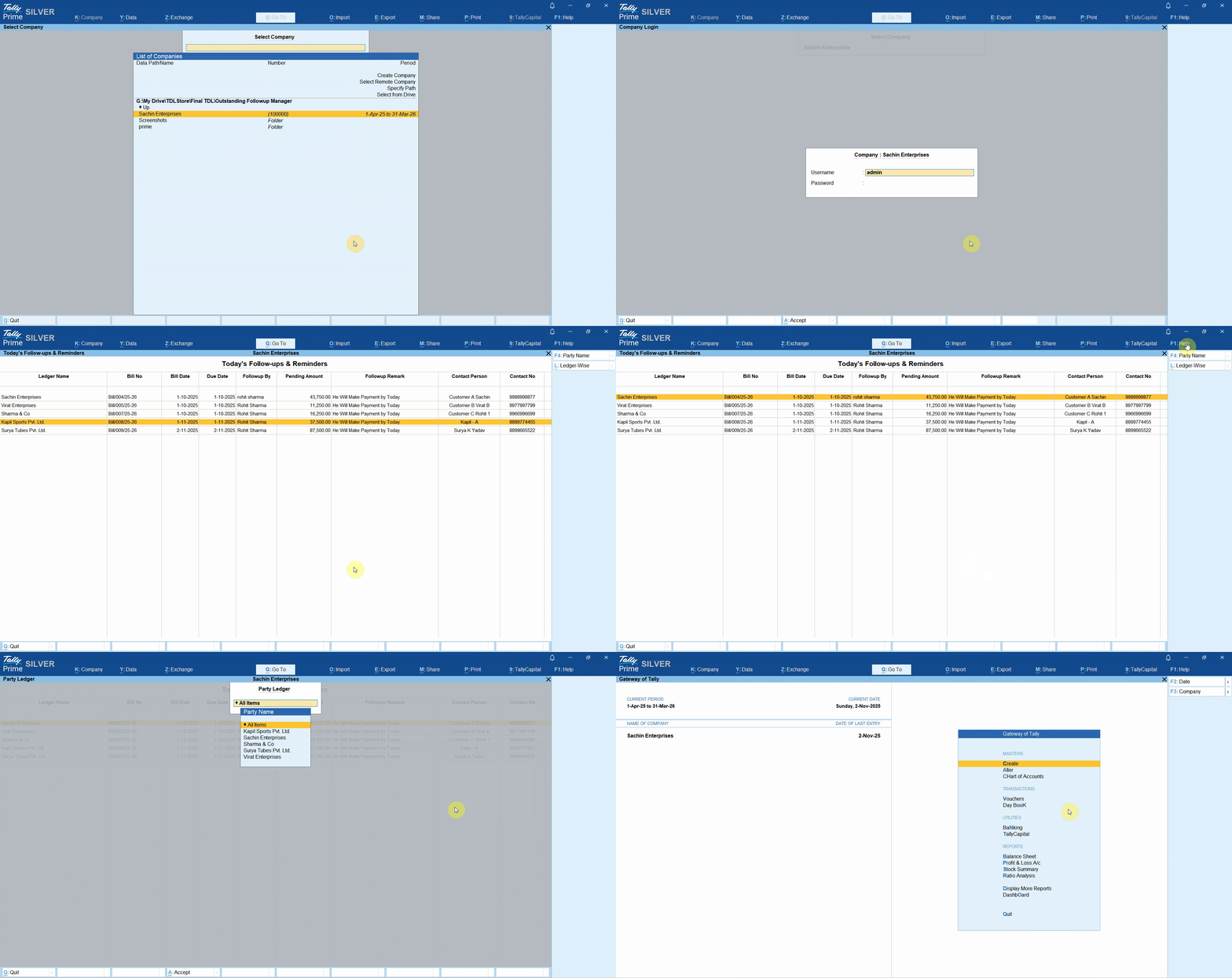
Ledger Wise Payment Follow-up
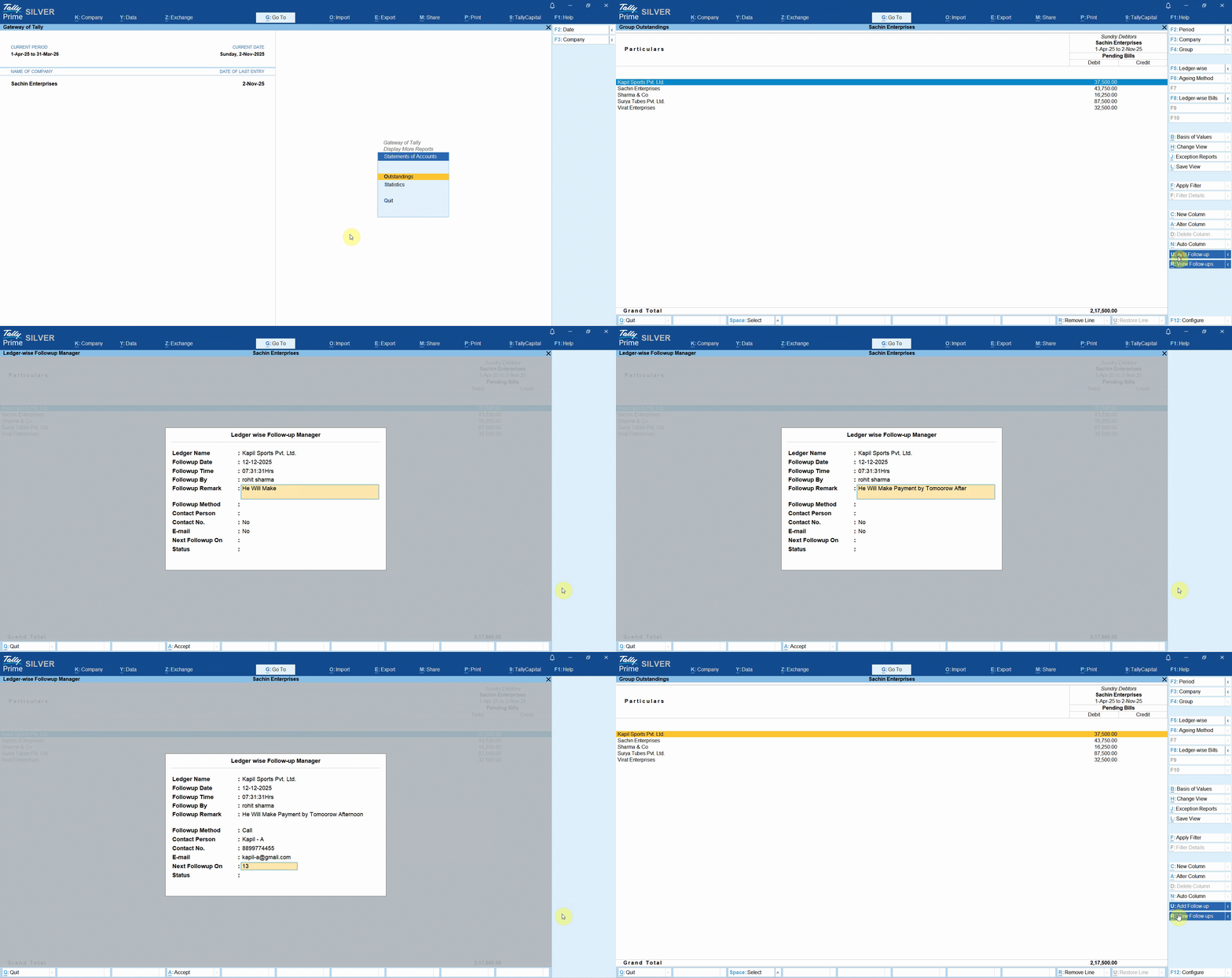
If you are making payment follow-up with your customer for overall ledger outstanding then you may record the follow-up notes at Ledger level as shown below;
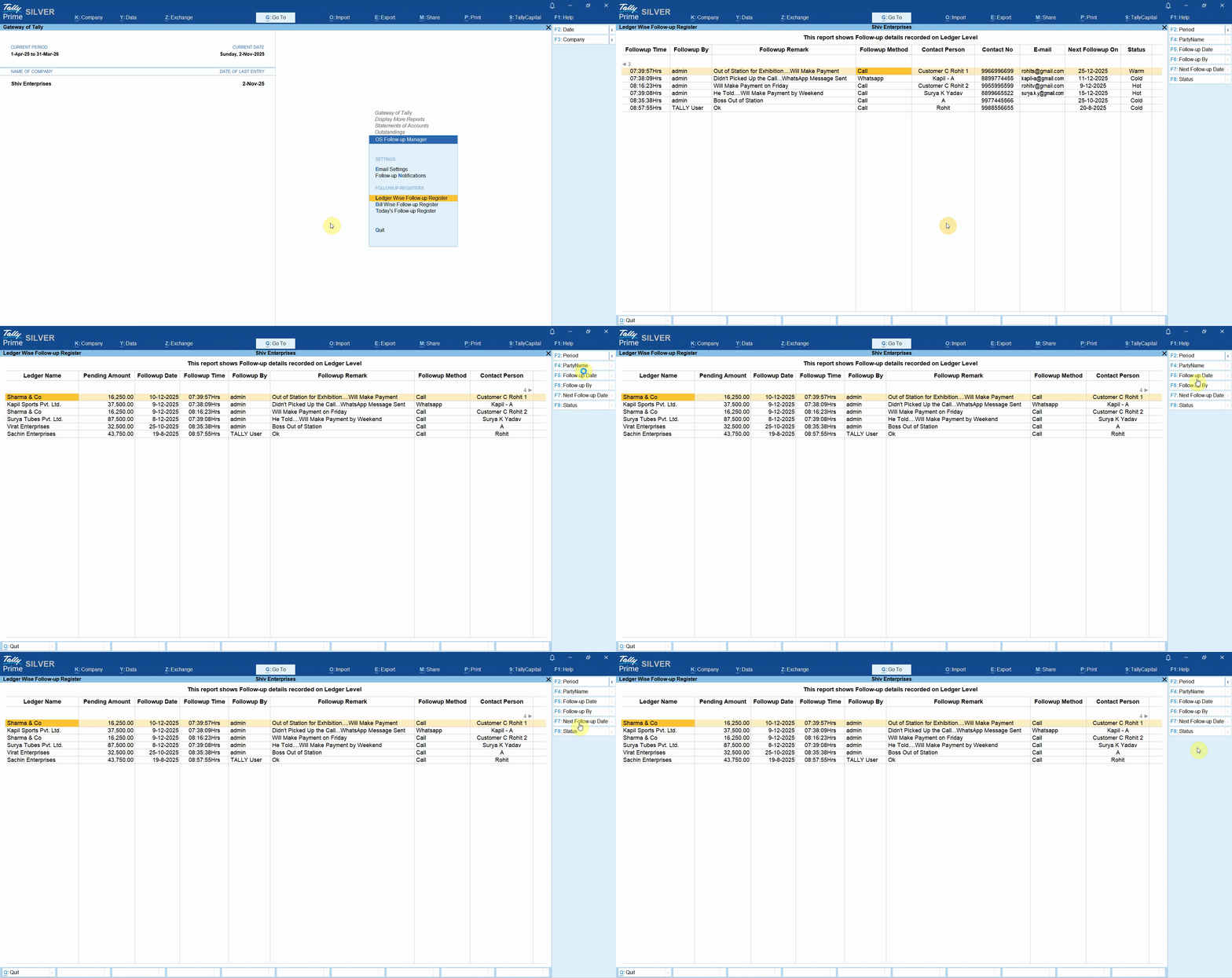
Based on the payment follow-up details captured above, you will able to view it in a Ledger Wise payment follow-up register;
Bill Wise payment Follow-up
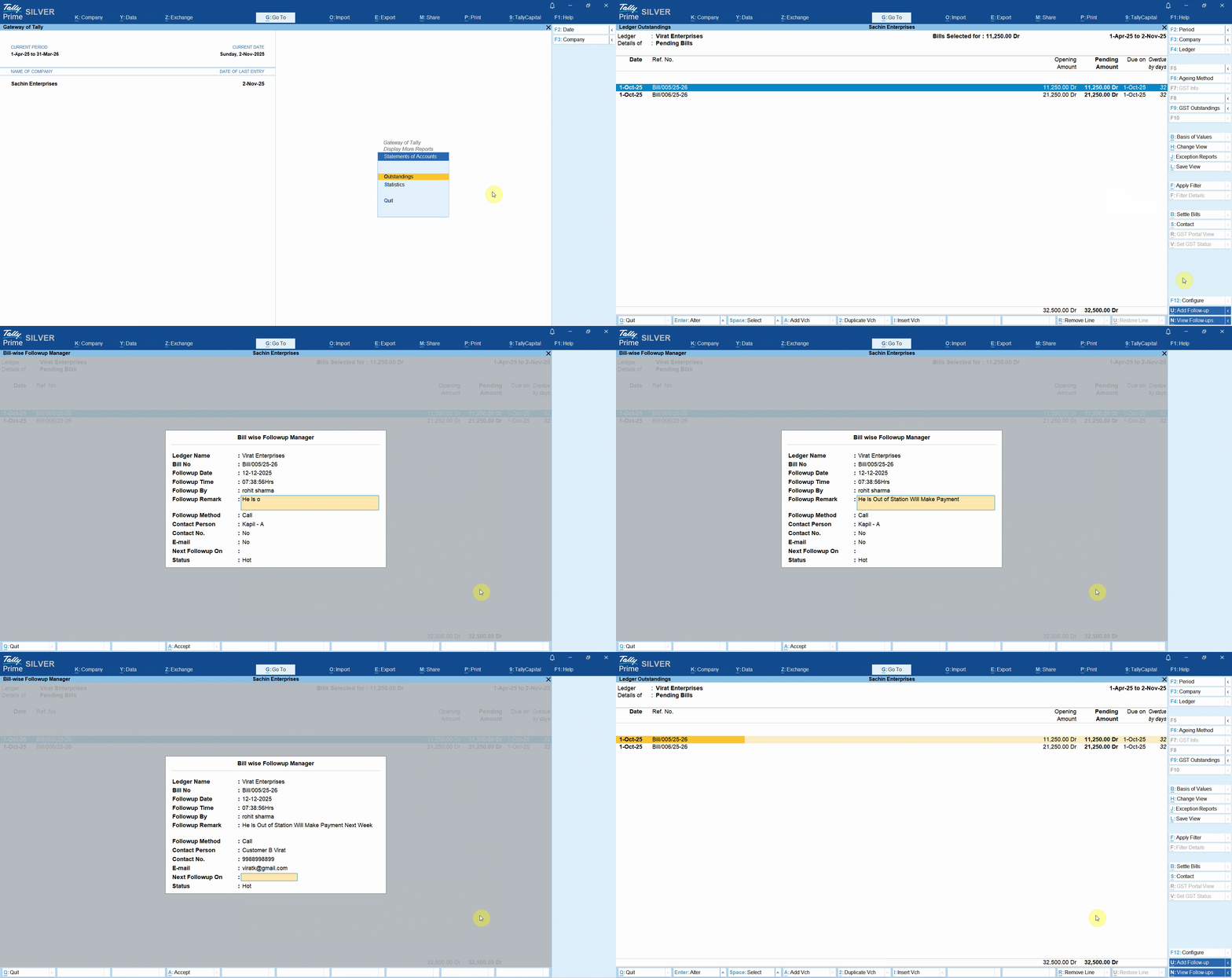
If you are making payment follow-up with your customer for Single or Multiple bills then you may record the follow-up notes at Bill level as shown below;
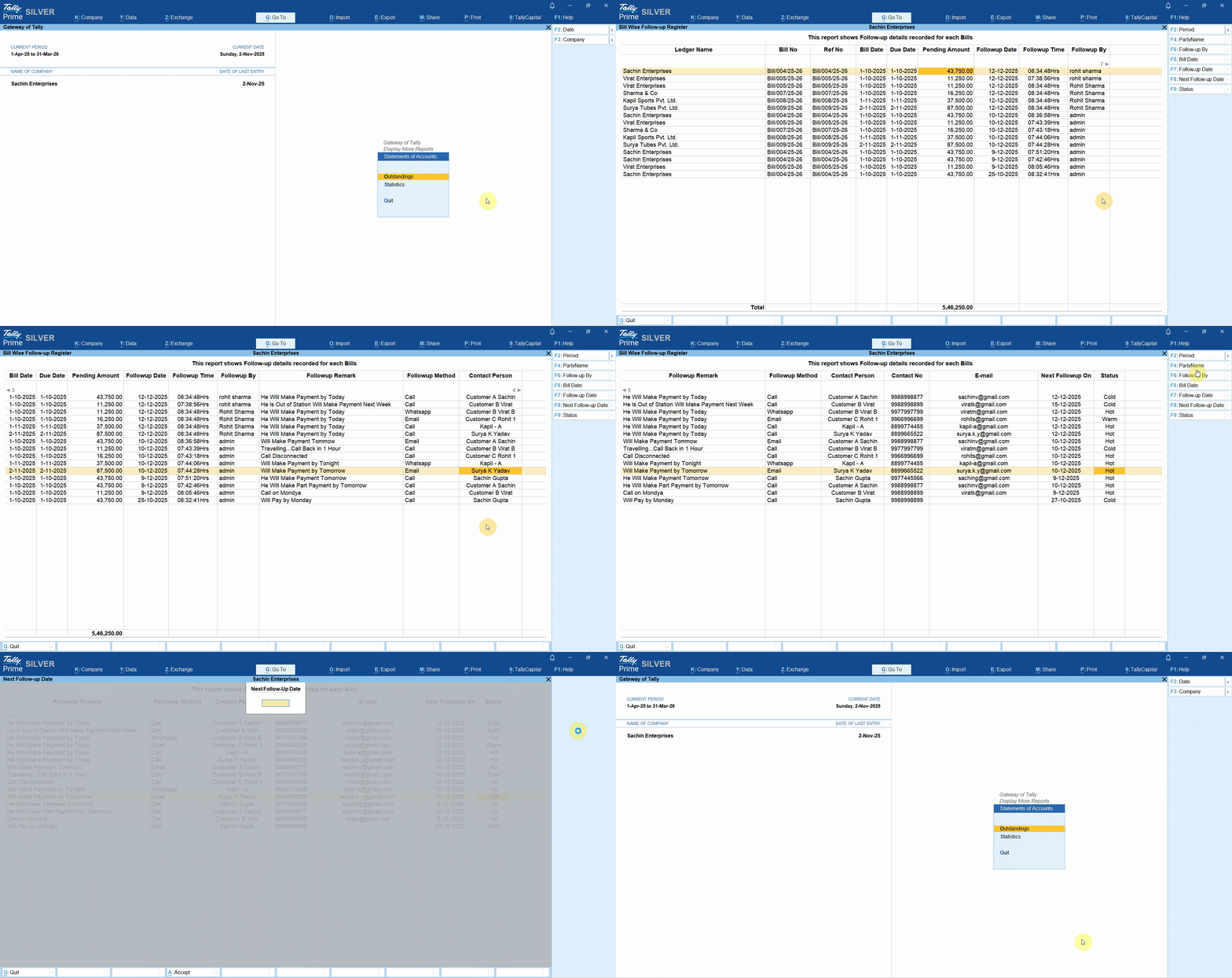
Based on the payment follow-up details captured above, you will able to view it in a Bill Wise payment follow-up register;
This register will help you and your team to track how many times payment follow-up has been taken from a particular customer.
It also helps you to track how many times your users have made payment follow-ups.
Today’s Payment Follow-up Register
This report will display list of payment follow-ups that are due as on date, so that you can make focused payment follow-ups to get payment faster!
LIFETIME VALIDITY
NO RENEWALS
7 DAYS MONEY BACK GUARANTEE
Works on Tally.ERP9 & TallyPrime
Clean & Verified Code
Here is the Quick Guide on How to Configure TDL / TCP in Tally!


Get answers to all your queries before you purchase our Tally add-ons.
Your TDL add-ons comes with Lifetime validity or Yearly Subscriptions?
All our TDL add-ons comes with truly Lifetime validity and updates
How do I purchase & get the add-ons?
It's very simple!
Simply add the required module to the cart > proceed for checkout > enter your complete billing information > place order > pay online!
On successful completion of payment, you will instantly get download link on the screen and well as in your email.
Can i get demo before purchase?
Yes, we have placed demo videos under each modules to see how exactly it works before you purchase.
We do not provide one on one demo for ready to use TDL add-ons.
Will it work on Tally.ERP9 or TallyPrime?
All our TDL add-ons are compatible with both Tally versions i.e. Tally.ERP9 and TallyPrime
How do I install TDL add-ons in my Tally?
It really very simple to configure TDL add-ons in Tally, please refer below quick video and i am sure you will be able to do it.
Will I get GST Invoice for my purchase?
Yes, you will get system generated GST invoice in your email ID immediately on successful purchase, if not found check Spam / Junk folder once.
What if your TDL add-on doesn't work in my Tally?
It works on all Tally but in case if our TDL add-on is conflict with your existing TDL's then you may either ask your existing TDL provider to correct it or simply place refund request with us by providing valid error screenshots.
Will it work on Tally multi user license?
Yes, our add-ons works on both Tally Single User and Multi User depending upon your Tally Serial number and the price will remain same for both.
Can I use add-ons on multiple Tally licenses?
If you have multiple Tally licenses, you will have to purchase it separately
Will it work on multiple companies in same Tally?
Yes, all our TDL add-ons works with any of your companies running on the same Tally license.
If you have separate Tally licenses, you will have to purchase it separately.
Will it impacts our Tally data?
No, these Tally add-ons are built securely on Tally definition language only, so it won't impact your Tally data.
However we always recommend users to take Tally backup before using any customization.
How will I get License Key for TCP activation?
License Key for your purchased TCP will be available immediately in the Email & Under My Account section on completion of your order & payment.
How can I use same TCP & License Key in multiple companies?
By default our TDL License key is permissible to use for one company only but if you have multiple companies running on the same Tally serial number then you may request for license extension request by reverting to the same purchase email.
You can even re-use or migrate the same license key by De-Activating the same key.
How much time it will take to receive the TDL after payment?
You will receive TDL instantly along with Activation License Key in your email ID as well as the same will be found under your Account section.
Related products

TDL for Address Book in Tally
Original price was: Rs. 1,999.Rs. 1,499Current price is: Rs. 1,499. + GST
TDL for Auto TDS Journal Posting
Original price was: Rs. 4,999.Rs. 2,999Current price is: Rs. 2,999. + GST
TDL for Broker Module in Tally
Original price was: Rs. 5,999.Rs. 2,999Current price is: Rs. 2,999. + GST
TDL for Cost Center Wise Balance Sheet and Profit & Loss in Tally
Original price was: Rs. 5,999.Rs. 3,999Current price is: Rs. 3,999. + GST
TDL for Display Last Purchase & Sales Rate of Items
Original price was: Rs. 2,999.Rs. 1,999Current price is: Rs. 1,999. + GST
TDL for Narration Size Increase in Tally
Original price was: Rs. 1,499.Rs. 999Current price is: Rs. 999. + GST
TDL for Price List Import in TallyPrime
Original price was: Rs. 3,999.Rs. 1,999Current price is: Rs. 1,999. + GST