

TDL for Advance Credit Control in TallyPrime
Original price was: Rs. 4,999.Rs. 2,999Current price is: Rs. 2,999. + GST
Take control of customer credit and prevent further billing when payment deadlines are exceeded. The Credit Control in TallyPrime Module automatically restricts the creation of new bills for selected customers if their Bill Due Date or Bill Grace Date has exceeded. This helps businesses reduce overdue payments, maintain credit discipline, and improve cash flow.
Example:
Suppose ABC Traders has an outstanding bill of ₹50,000 with a Due Date of 10 October and a Grace Date of 15 October.
- Before the deadline: New bills can be created as per the configured credit rules.
- After the Due Date: If the due-date restriction applies, TallyPrime blocks new bills for ABC Traders.
- After the Grace Date: If the grace-date restriction applies, TallyPrime blocks new bills even if the customer is allowed additional time to pay.
The module helps you enforce customer-wise credit policies and avoid increasing outstanding receivables without manual monitoring.
Download 3 Days Free Trial Now
| Mode of Support | Anydesk, Email, Ultra Viewer, Zoom Meeting |
|---|---|
| Supported Version | Tally.ERP9, TallyPrime |
| Updates | Free |
| User Type | Multi User, Single User |
🎉 Festive Offer 🎉
🏹 Dussehra Se 🪔 Diwali Tak - Get 20% Off on all TDL add-ons - Code : " FESTIVE20 "
🗓️ Valid on Purchase between 20th October 2026 to 11th November 2026
User Guide on how to use Advance Credit Control Module in TallyPrime
The Credit Control Module helps businesses maintain better control over customer credit and outstanding payments in TallyPrime. It prevents users from creating new sales bills for selected customers when their outstanding bills have crossed the configured credit deadline.
Businesses often allow customers to purchase goods on credit for a specified period. However, when customers fail to pay their outstanding bills on time, allowing further credit can increase receivables and create cash-flow problems.
The module provides two restriction modes:
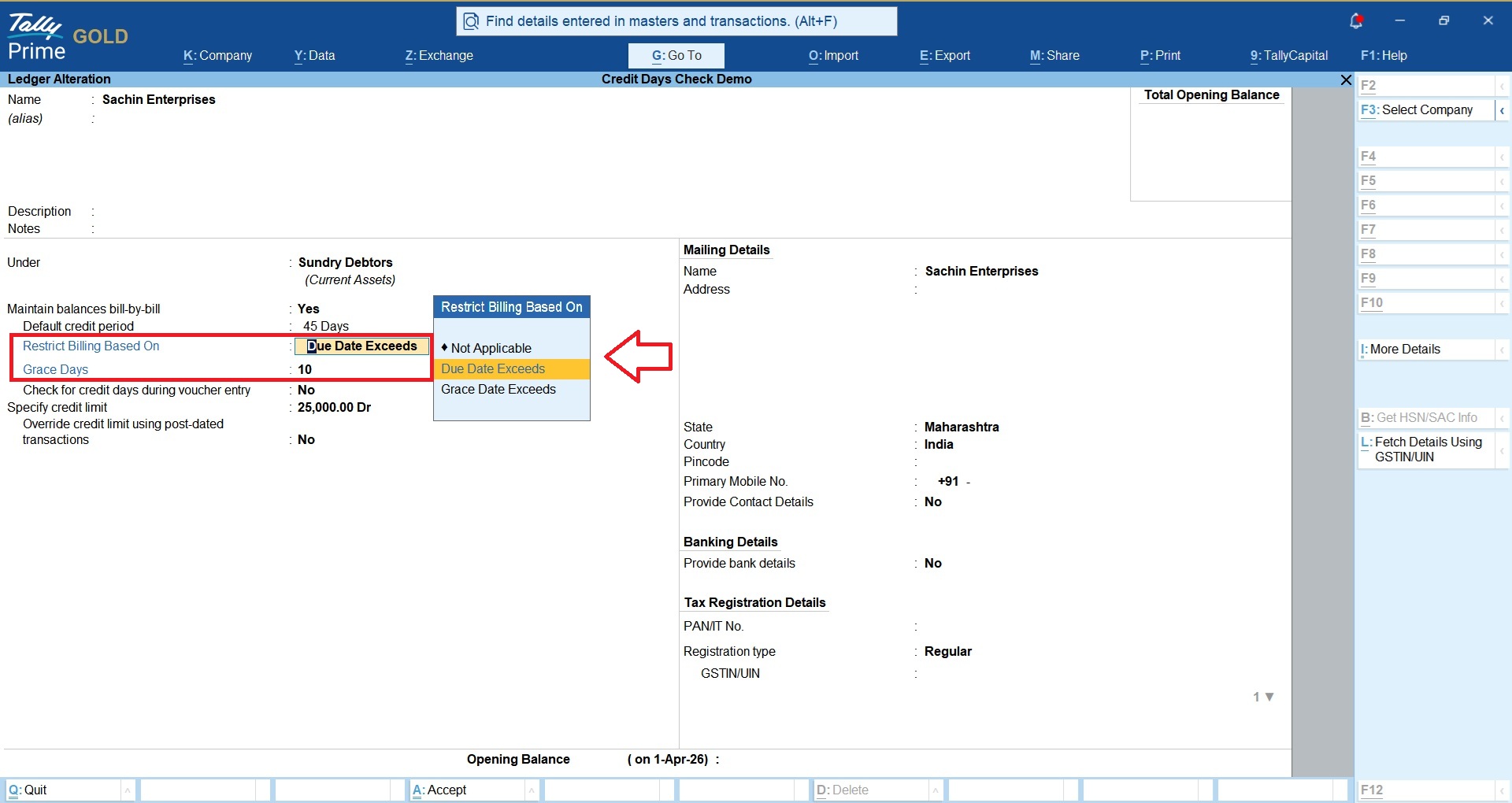
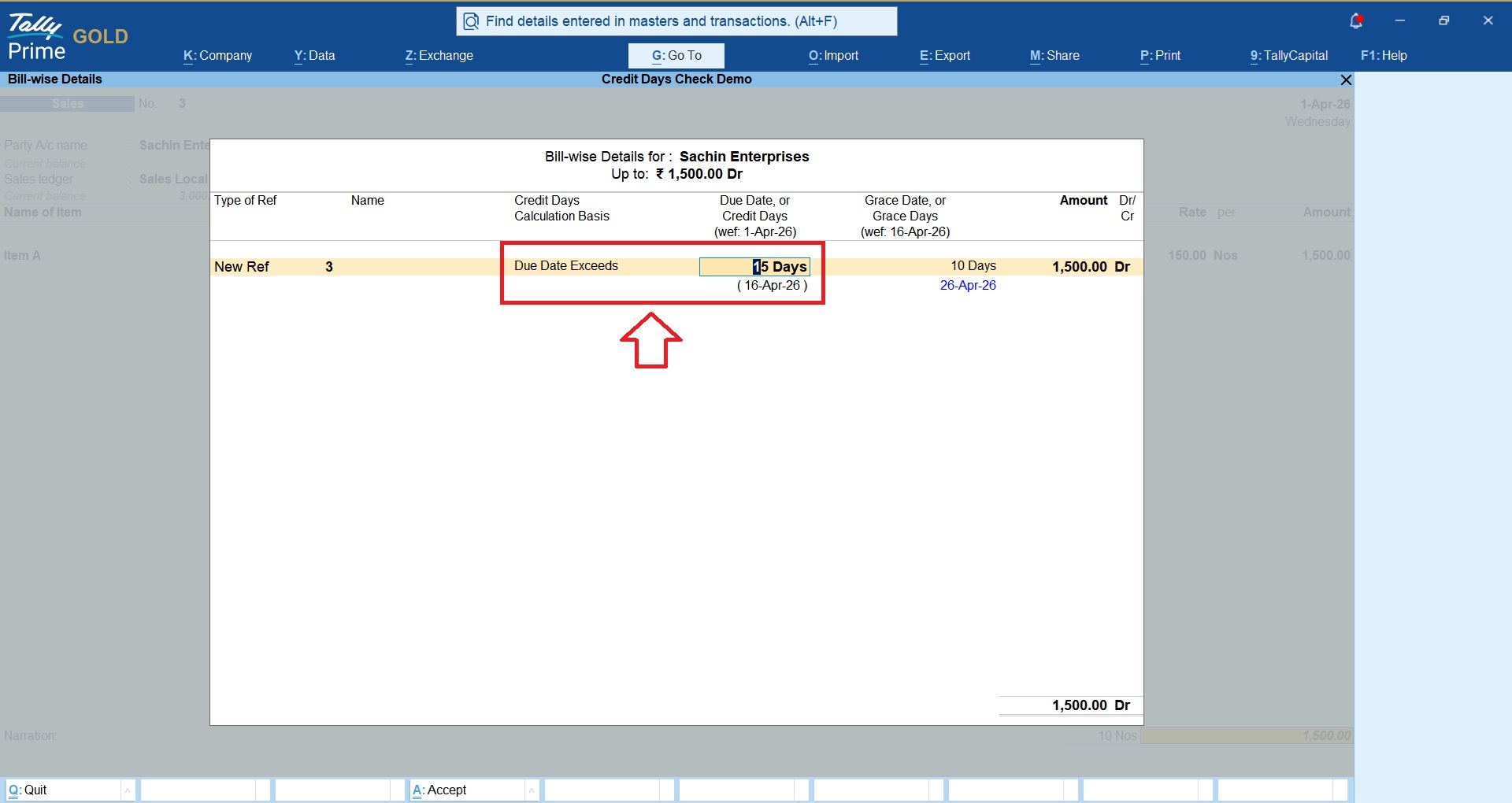
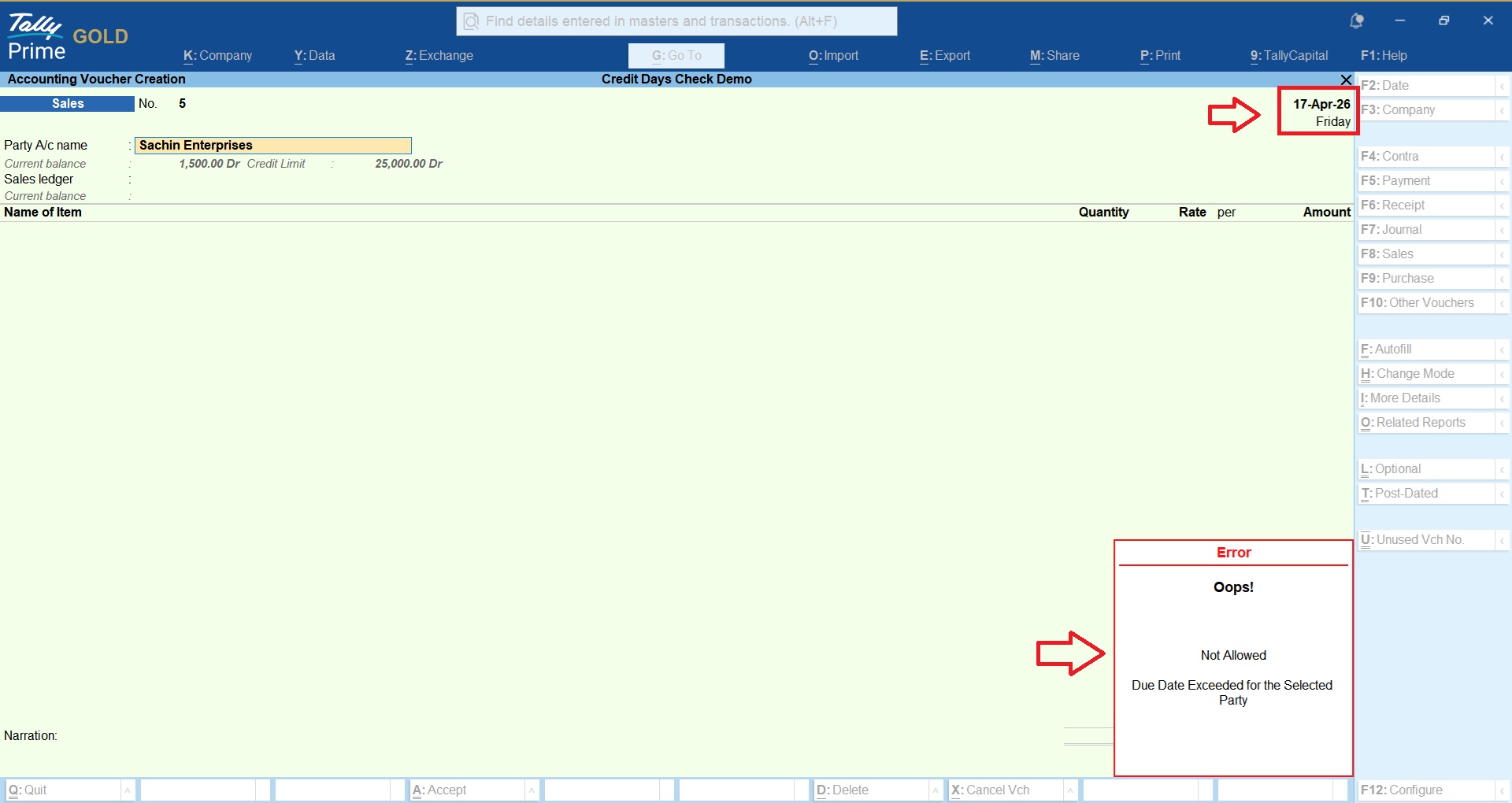
A. Due Date based Restriction
Under this option, TallyPrime restricts new billing when an outstanding bill’s Due Date has been exceeded.
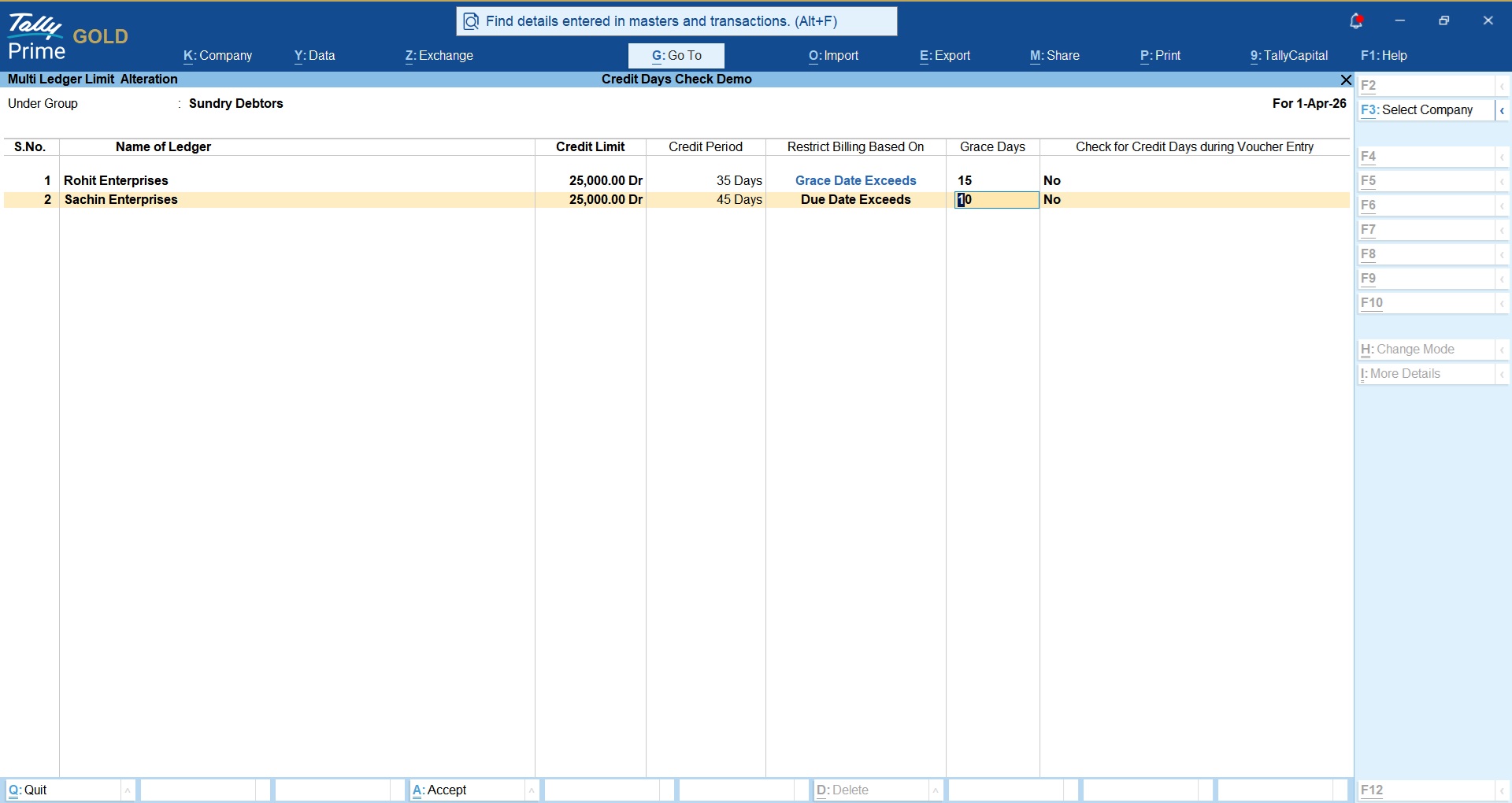
In the following example, Sachin Enterprises is restricted on a Date Date restriction basis. Now, if a Sachin Enterprise having outstanding bill has a Due Date of 16 April 2026, the module will prevent new billing when the transaction date crosses the configured Due Date.
This option is suitable for businesses that want strict control over Due Date based payment deadlines.
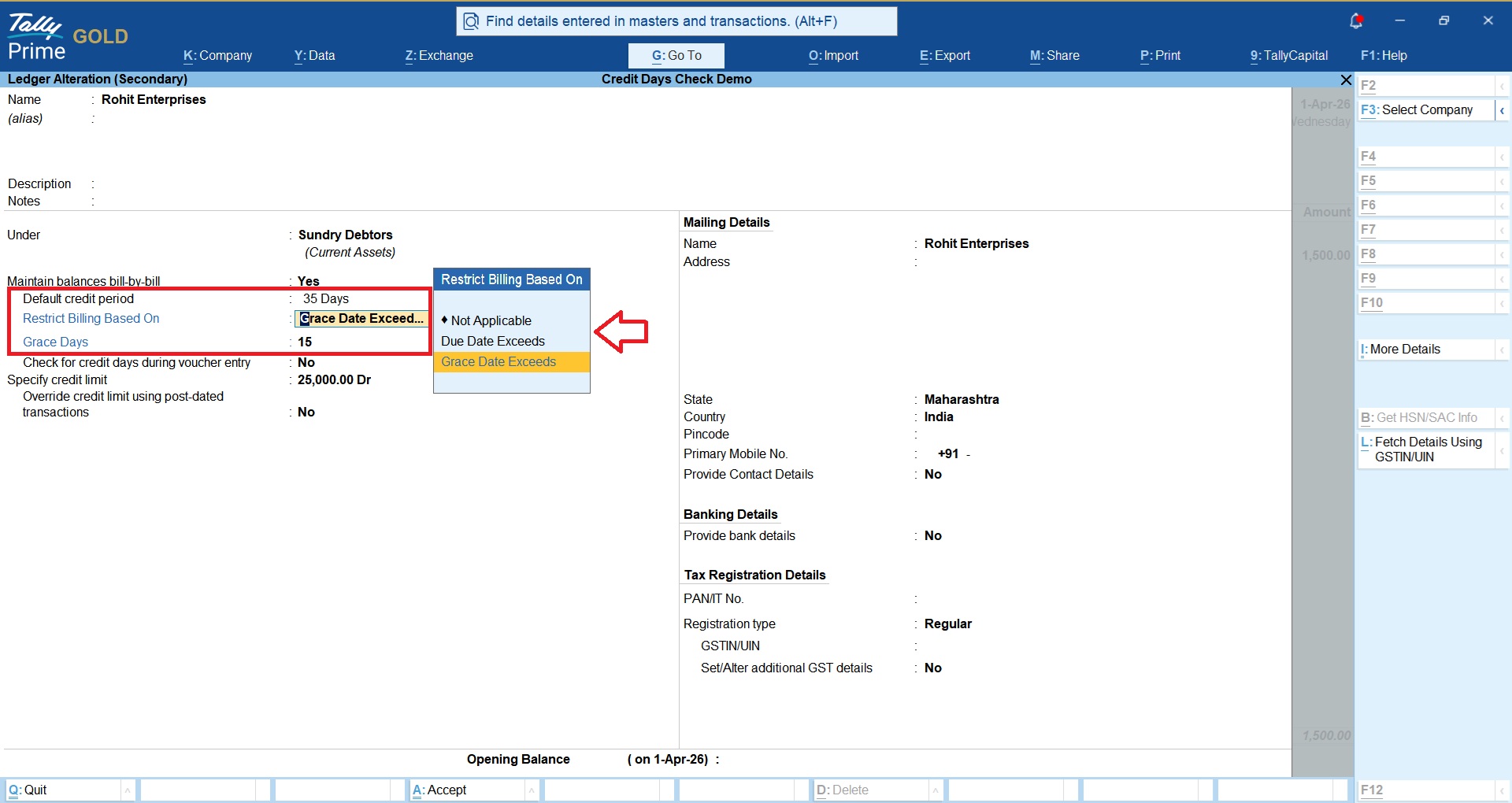
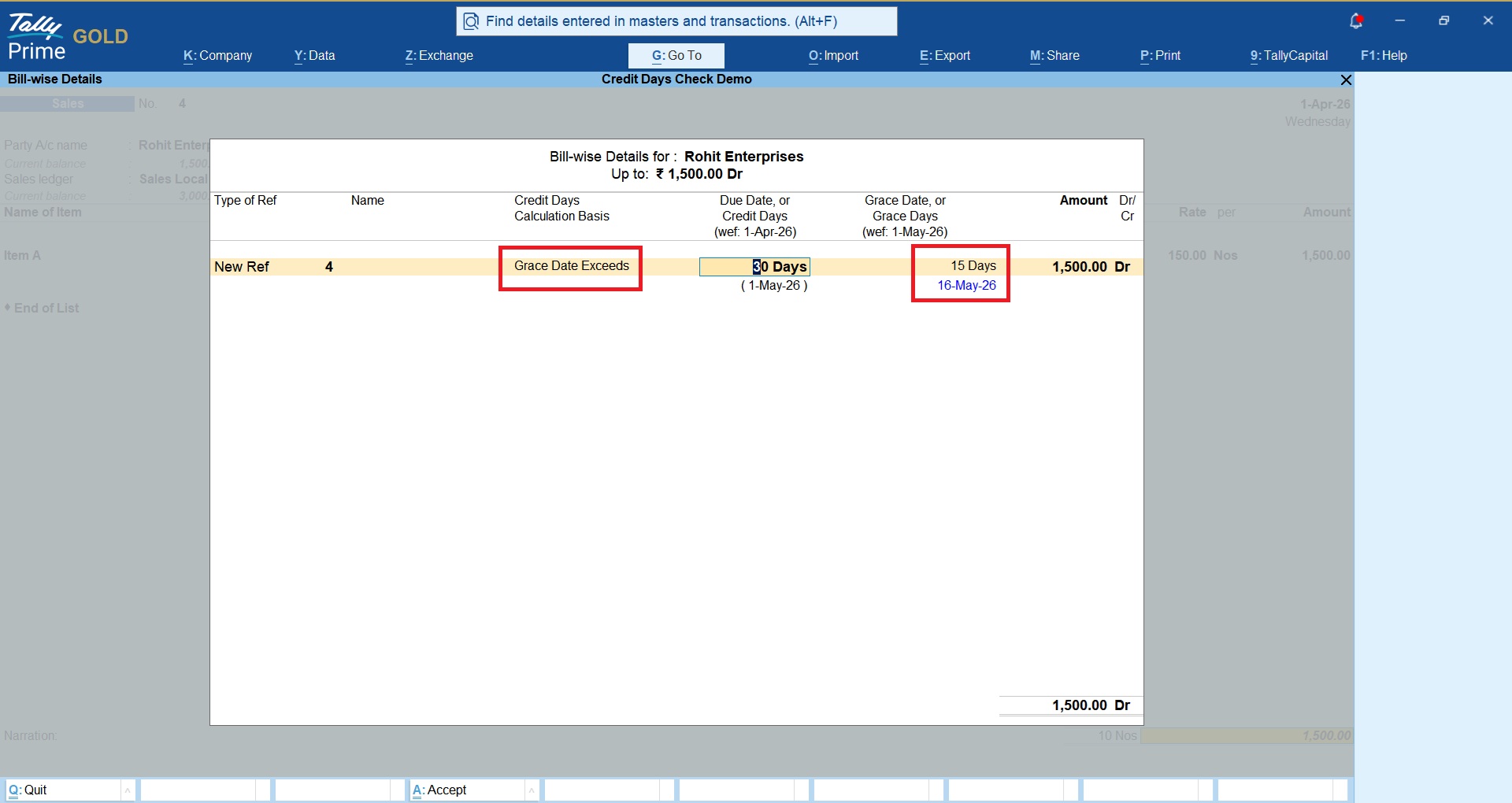
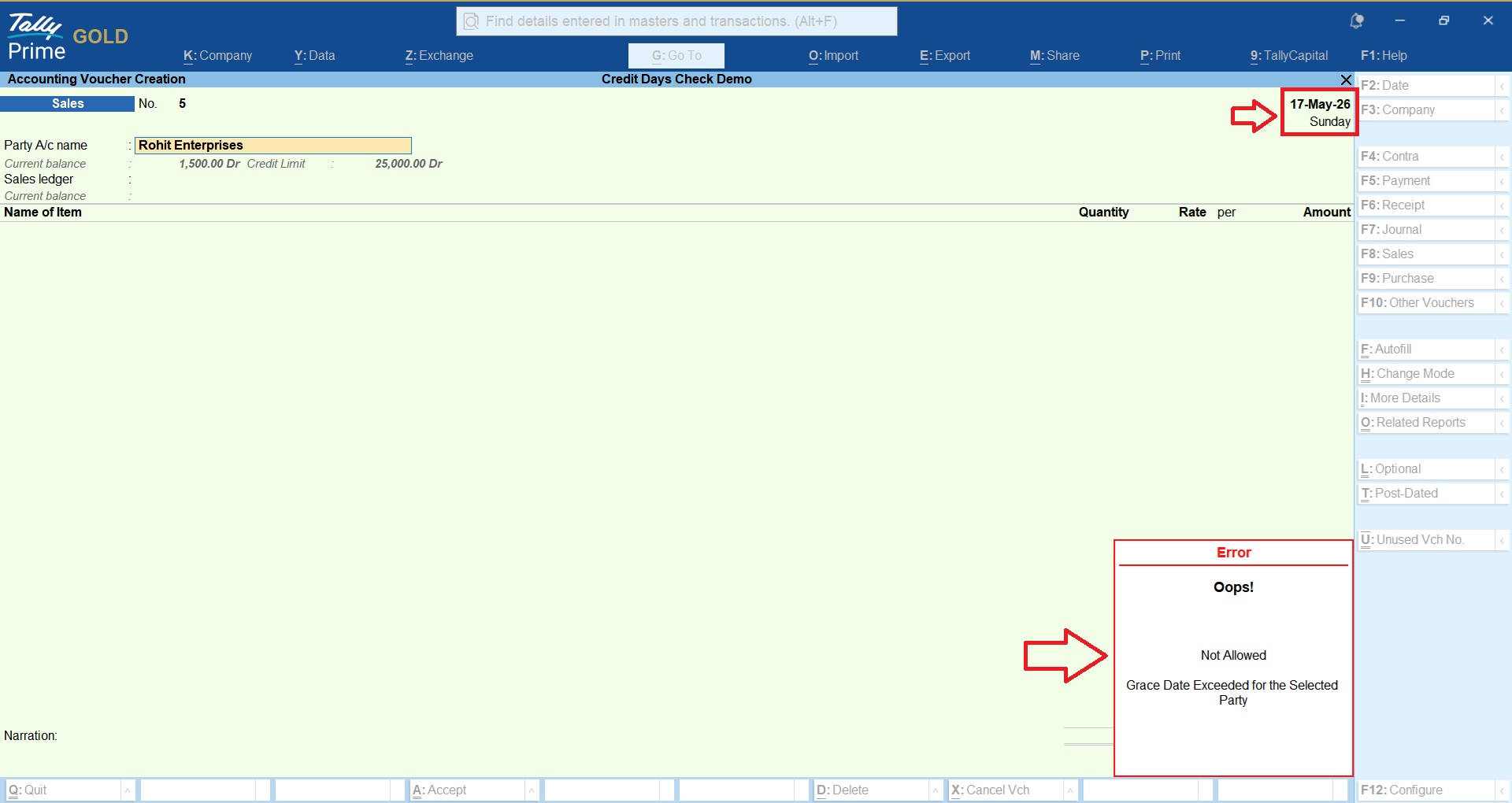
B. Grace Date based Restriction
Under this option, TallyPrime restricts new billing when an outstanding bill’s Grace Date has been exceeded.
In the following example, Rohit Enterprises is restricted on a Grace Date restriction basis. Now, if a Rohit Enterprise having outstanding bill has a Grace Date of 16 May 2026, the module will prevent new billing when the transaction date crosses the configured Grace Date.
This option is suitable for businesses that want to allow Grace Days to the customers and restrict billing when outstanding exceeds allowed Grace Date.
C. Bulk Update of Due Dates & Grace Dates
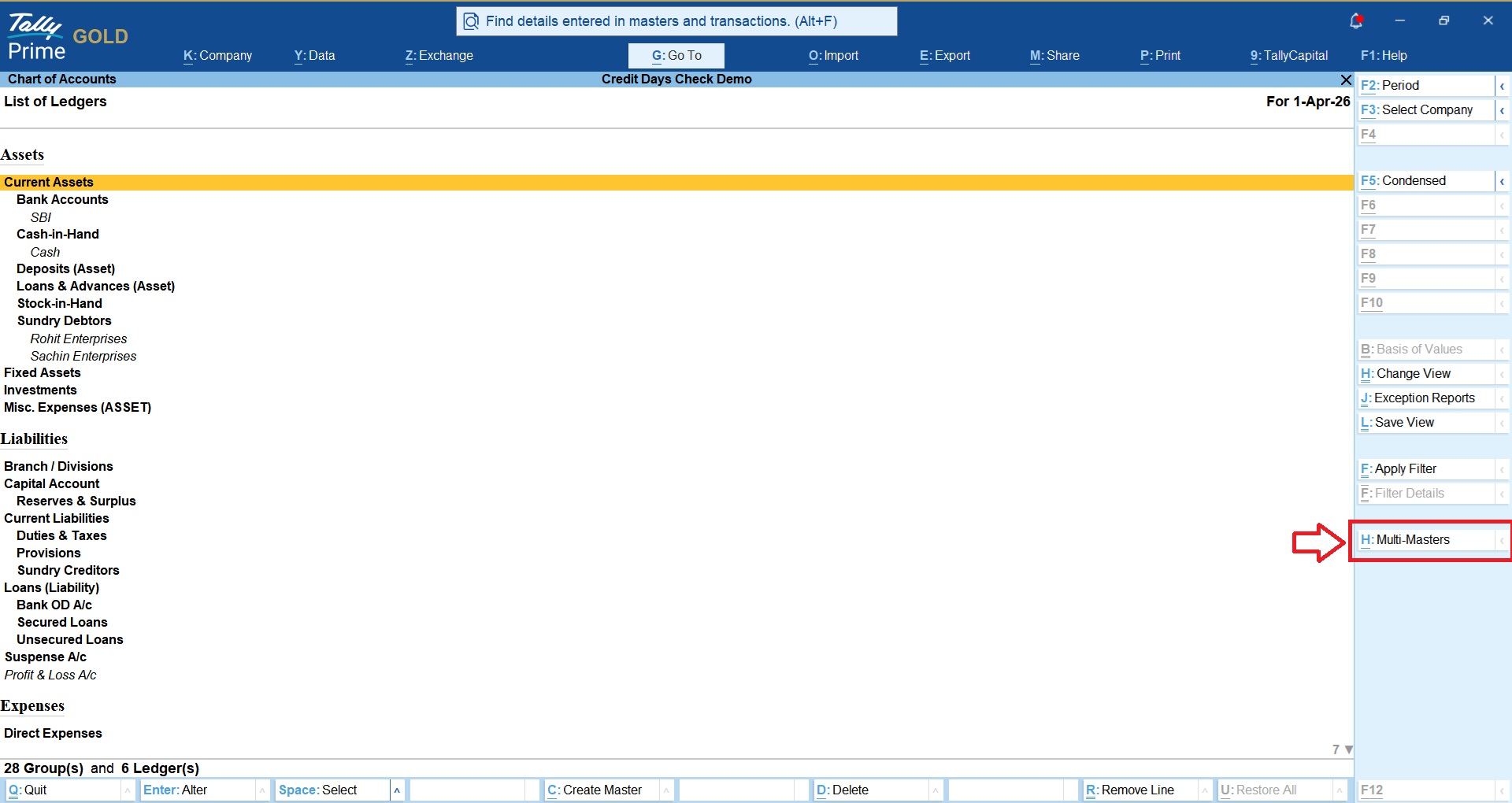
This option helps you to bulk update default Due Days, Grace Days and Restriction criteria to all your existing customers.
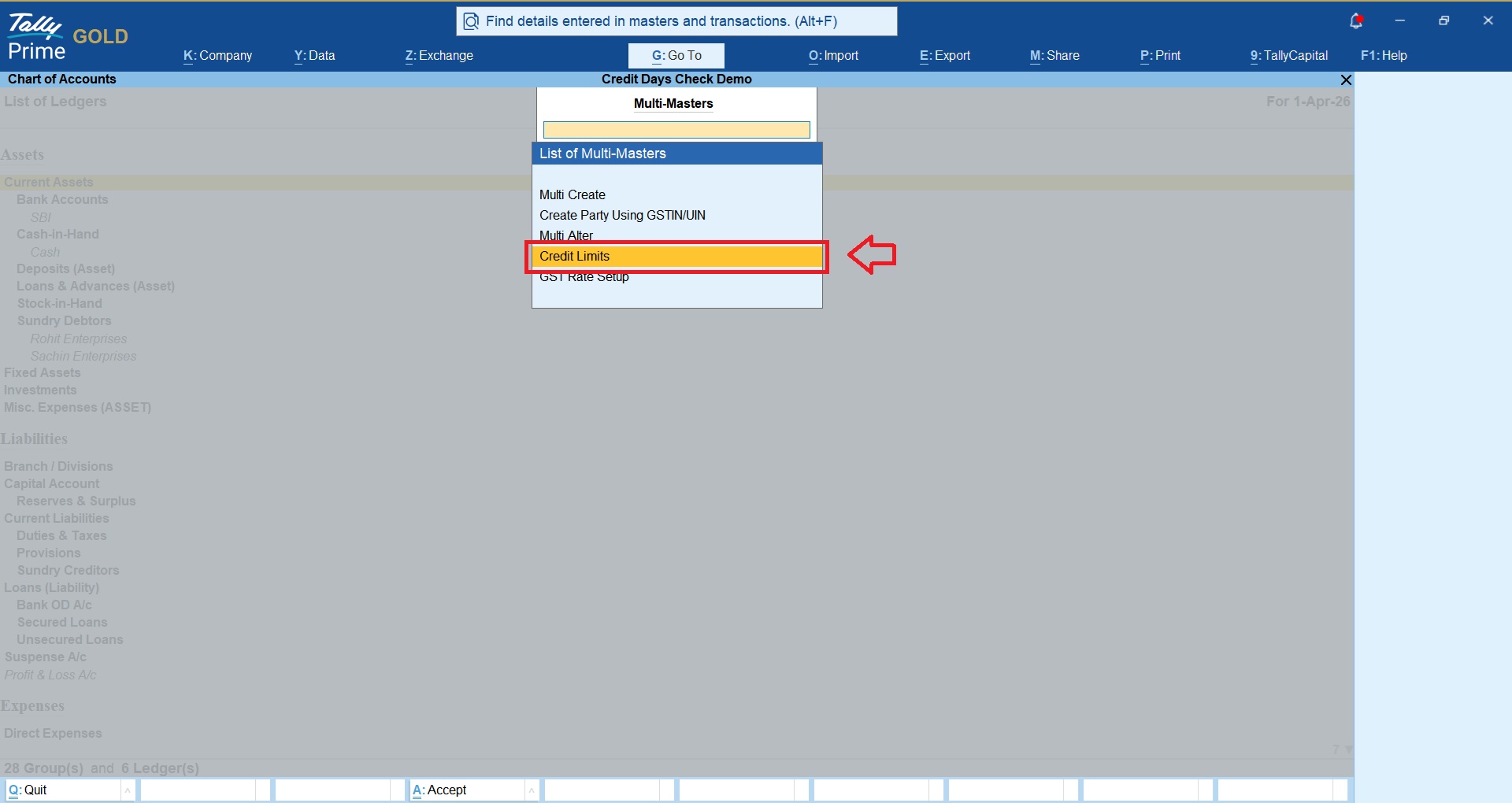
To bulk update Due Days, Grace Days, navigate to Gateway of Tally > Chart of Accounts > Ledgers > Click on Multi-Masters > Credit Limits
Get answers to all your queries before you purchase our Tally add-ons.
Your TDL add-ons comes with Lifetime validity or Yearly Subscriptions?
All our TDL add-ons comes with truly Lifetime validity and updates
How do I purchase & get the add-ons?
It's very simple!
Simply add the required module to the cart > proceed for checkout > enter your complete billing information > place order > pay online!
On successful completion of payment, you will instantly get download link on the screen and well as in your email.
Can i get demo before purchase?
Yes, we have placed demo videos under each modules to see how exactly it works before you purchase.
We do not provide one on one demo for ready to use TDL add-ons.
Will it work on Tally.ERP9 or TallyPrime?
All our TDL add-ons are compatible with both Tally versions i.e. Tally.ERP9 and TallyPrime
How do I install TDL add-ons in my Tally?
It really very simple to configure TDL add-ons in Tally, please refer below quick video and i am sure you will be able to do it.
Will I get GST Invoice for my purchase?
Yes, you will get system generated GST invoice in your email ID immediately on successful purchase, if not found check Spam / Junk folder once.
What if your TDL add-on doesn't work in my Tally?
It works on all Tally but in case if our TDL add-on is conflict with your existing TDL's then you may either ask your existing TDL provider to correct it or simply place refund request with us by providing valid error screenshots.
Will it work on Tally multi user license?
Yes, our add-ons works on both Tally Single User and Multi User depending upon your Tally Serial number and the price will remain same for both.
Can I use add-ons on multiple Tally licenses?
If you have multiple Tally licenses, you will have to purchase it separately
Will it work on multiple companies in same Tally?
Yes, all our TDL add-ons works with any of your companies running on the same Tally license.
If you have separate Tally licenses, you will have to purchase it separately.
Will it impacts our Tally data?
No, these Tally add-ons are built securely on Tally definition language only, so it won't impact your Tally data.
However we always recommend users to take Tally backup before using any customization.
How will I get License Key for TCP activation?
License Key for your purchased TCP will be available immediately in the Email & Under My Account section on completion of your order & payment.
How can I use same TCP & License Key in multiple companies?
By default our TDL License key is permissible to use for one company only but if you have multiple companies running on the same Tally serial number then you may request for license extension request by reverting to the same purchase email.
You can even re-use or migrate the same license key by De-Activating the same key.
How much time it will take to receive the TDL after payment?
You will receive TDL instantly along with Activation License Key in your email ID as well as the same will be found under your Account section.
Related products

TDL for Audit Trail in Tally
Original price was: Rs. 2,999.Rs. 1,999Current price is: Rs. 1,999. + GST

TDL for Lock Invoice if eInvoice Generated
Original price was: Rs. 2,999.Rs. 1,999Current price is: Rs. 1,999. + GST
TDL for Maker, Checker, Approval Workflow in TallyPrime
Original price was: Rs. 6,999.Rs. 4,999Current price is: Rs. 4,999. + GST
TDL for OTP Based Login in Tally
Original price was: Rs. 4,999.Rs. 2,999Current price is: Rs. 2,999. + GST
TDL for Restrict Back Dated Entries in Tally
Original price was: Rs. 1,999.Rs. 1,499Current price is: Rs. 1,499. + GST
TDL for Restrict Negative Stock in Tally
Original price was: Rs. 1,999.Rs. 1,499Current price is: Rs. 1,499. + GST